
Contents
Have you ever wondered how Google displays rich results like product prices, images, and reviews? You search for a product and see exactly what you want, complete with prices, reviews, and images from different retailers. This may seem mundane to you, but something technical goes behind the scenes – schema markup.
Schema markup is a structured data code added to a website to help Google understand its content. It’s how Google picks up the accurate information to display on rich snippets. Schema markup is an essential part of search engine optimisation (SEO), so let’s dive deep into it and how to apply it to boost search rankings.
What is schema markup?
Schema markup is semantic code added to a website’s HTML backend to help search engines understand its content. Think of it like writing instructions on a map to highlight specific landmarks. In this case, you’re adding code to highlight specific content types (e.g., prices, event dates, and customer reviews) for search engines.
There are over 800 types of schema markup code, each to highlight a specific type of content. All of them are publicly documented on the Schema.org website.
How schema helps search engines understand content
A schema is specialised code you add to your website. You can add it manually to your website’s codebase. Alternatively, if you use a content management system (CMS) like WordPress or Shopify, basic schema code is automatically added when you enter product details.
Schema code ensures search engines understand exactly what a piece of content is, instead of relying on algorithms. It’s like an item labeled clearly on a map so that you don’t have to guess what it is based on the shape.

Types of schema markup
As of writing, there are 823 types of schema markup code. If we decide to describe them all, you’ll spend too much time in this section and get bored, so we’ll rather describe just some of the most important ones.
LocalBusiness
This type denotes a physical business, like a restaurant or cinema, and its associated properties. Let’s see some LocalBusiness schema markup examples:
| currenciesAccepted | It lists the currencies accepted at the business location. |
| openingHours | Highlights the general opening hours of the business. |
paymentAccepted | Denotes the payment methods accepted at the location. |
| address | The physical/postal address listed on Google. |
| aggregateRating | The location’s overall rating, based on customer reviews. |
IndividualProduct
This schema type represents a single, identifiable product and its properties.
| serialNumber | The product’s unique alphanumeric identifier. |
| countryOfAssembly | The country where the product was assembled. |
| displayLocation | The physical location where someone can view the product in person. |
NewsArticle
This schema type represents content that reports news. Some examples are:
| dateline | A piece of text indicating where and when the news article was written. |
| wordCount | The number of words in the article. |
| author | The author of the news piece. |
If you’re as curious as a cat and want to know all the schema types, the full list is accessible on Schema.org.
The above examples illustrate what we’ve said: schema is just simple code that indicates what a piece of content is about.
Why schema markup matters for SEO
We’ve emphasized that schema markup code defines what different parts of a webpage are about. It tells search engines exactly what a piece of content is and when to display it. This process translates into benefits like:
Improving click-through rates in SERPs
When search algorithms know exactly what your content is about, they suggest it to the right users on search engine results pages (SERPs). Your content will be paired with the exact search intent it’s meant to serve.
For example, if someone searches for “shoes under $50,” and schema markup code indicates your online store has shoes under this price range, your products can be suggested to the person. This accurate pairing encourages the searcher to click on your content.
Enhancing rich snippets and search appearance
Have you ever searched for something on Google and seen rich snippets like these:
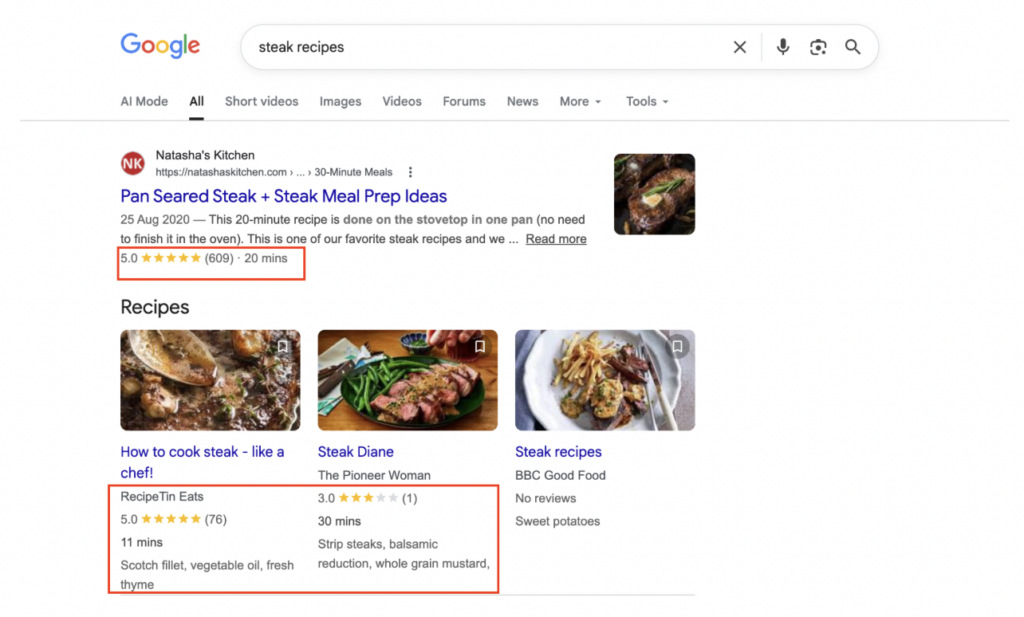
In the above example, we searched for “steak recipes,” and Google highlighted reader reviews and preparation times for specific recipes. It demonstrates something: these websites used schema markup code to denote review and time preparation data, and Google displayed the exact results.
Seeing rich snippets makes people want to click on a webpage for more information. When you use schema markup, your webpage gets similar rich snippets, encouraging searchers to click on it.
Supporting voice search
Many people use Google Assistant or Siri to search for information. These voice assistants rely on schema markup to identify the exact content to play back to users.
- For example, the openingHours schema indicates when your restaurant is open, and someone asking for “restaurants open near me” can be suggested to visit your location.
With proper schema markup code, voice search users get accurate results that draw traffic to your webpage or physical business.
How to implement schema markup
Schema markup can be implemented manually or automatically. You can add it directly into your website’s backend or use plugins/content management systems that generate schema markup code automatically for webpage content.
Manual implementation vs. Plugins
If adding code manually, Google’s free Structured Data Markup Helper is a great companion. You can paste your webpage URL, then select a page element you want to add schema markup code for. Then, the Structured Data Markup Helper will automatically generate schema code for that element, and you’ll manually add the code to your website.
To demonstrate how to add schema markup to a website, we’ve chosen to add it for an image on one of our blog posts:

After selecting the image and clicking on Create HTML (the button pointed with a green arrow), Google’s Structured Data Markup Helper automatically generated the code for the image:
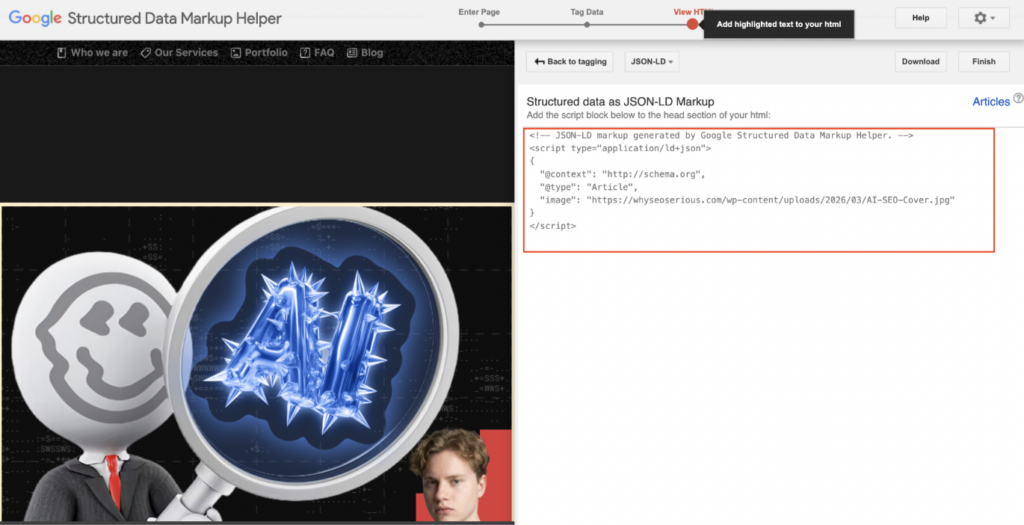
All we had to do was add the schema code (highlighted in the red box) to our blog post’s backend, and everything was set! We expect to see this image on a search results page soon.
If using a plugin, you don’t have to go through the above process. Just publish your content, and the plugin automatically generates and adds schema code to the backend. These plugins, such as Yoast SEO, can be easily installed on content management systems like WordPress. Better off, some content management systems have built-in plugins.
Testing and validating your schema
You’ve added schema, either manually or automatically, but don’t rest just yet. You need to validate the schema code, ensuring that it’s present for search engine algorithms to read.
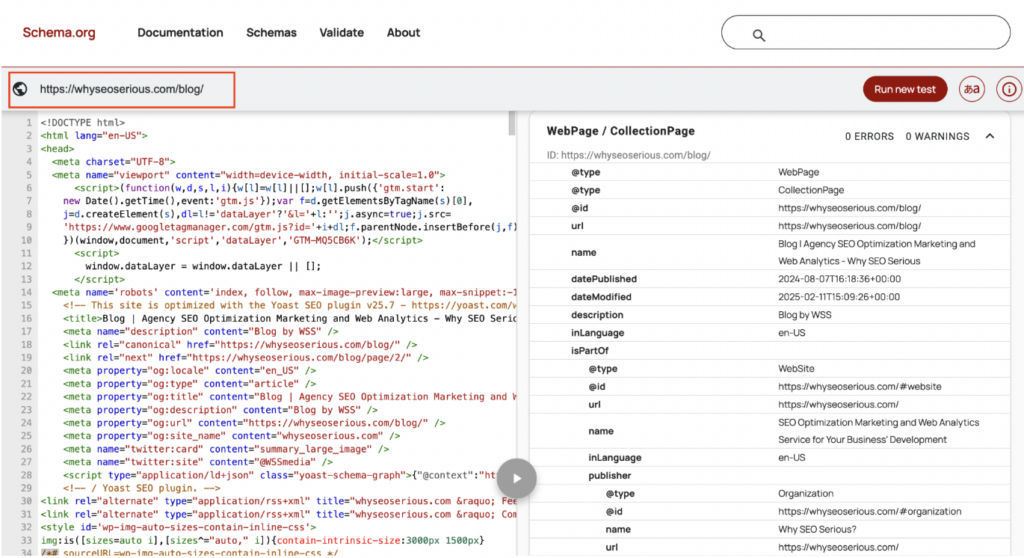
The Schema.org Markup Validator is a free, simple tool that fulfills this function. Just visit the page, paste in your webpage URL, and you’ll see all structured data detected on the webpage, like in the example below:
If there are schema SEO errors on your webpage, the Markup Validator will highlight them:
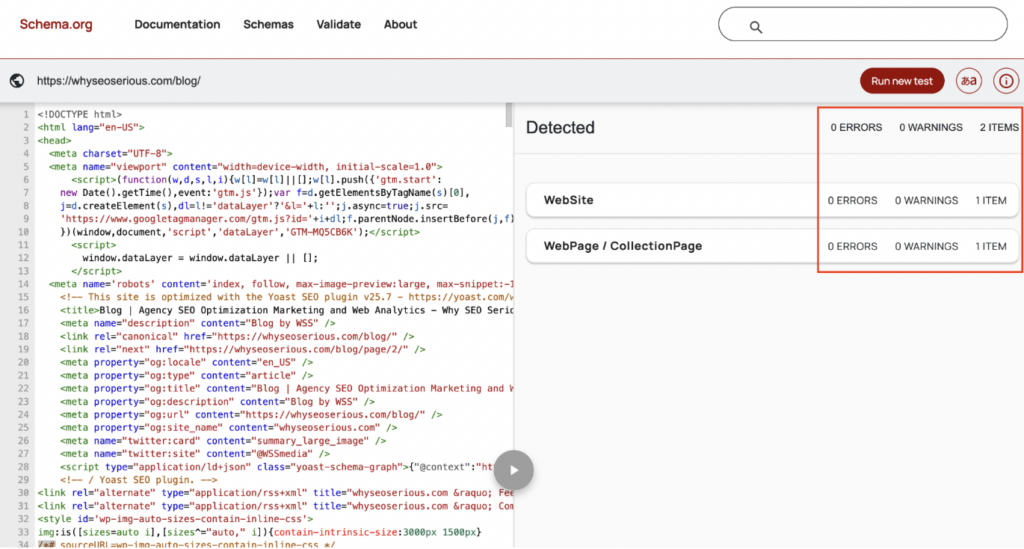
Given we used our official blog in the above example, we’re pleased to know that no schema errors were found. It should be the same for your website.
Using schema markup generators
Just earlier, we detailed how to use Google’s free Structured Data Markup Helper to generate schema markup code. You’ll be happy to know about other free tools available for the same function.
For example, there’s the Dentsu Schema Markup Generator. On this tool, you can choose any type of schema, specify its details, and have code automatically generated.
There’s also Schema.dev’s Schema Builder, which functions differently. This tool is first installed as a Chrome extension. Then, when browsing your webpage, you can simply click on the element you want to add schema for, and the code will be quickly generated.
With various markup generators freely accessible, you don’t have to stress about adding proper schema code to your website.
Leveraging AI for schema markup
If you’ve been online lately, you’ve likely heard a lot about the rapid growth of artificial intelligence (AI) tools. Even if someone lived under a cave, AI tools have become so trendy that the news somehow reached the cave. These tools help considerably with content creation and optimisation, and schema markup management is a major use case.
AI tools help generate, add, validate, and update schema markup code faster. Schema-related tasks that usually take a long time now take much less because of these tools. Let’s explore some ways of leveraging AI for schema markup:
Using AI tools to generate and optimise schema
Remember when we selected a piece of content on Google’s Structured Data Markup Helper, and schema code was automatically generated for it? AI tools can do the same.
For example, you can ask ChatGPT or Claude to generate schema code for a webpage element. These chatbots can also help generate meta descriptions, alt text, titles, and other on-page SEO properties.

Plugins like Yoast SEO now incorporate AI to automatically generate schema code for webpages. In summary, generating schema code has become much easier and accessible to website owners.
Automating schema updates for large sites
Picture this situation: you conduct the usual annual content updates for your website, modifying dates, adding new trending content, removing outdated content, and more. You don’t want to start thinking about manually updating the schema code for each updated page, as that’s too much to bear. That’s where AI comes in.
AI tools can generate the raw code for you, and some modern SEO plugins use AI to suggest or update schema based on your page content. However, you still need to copy-paste the code or approve the changes manually. AI handles the grunt work, while you validate the schema updates and spend more time honing your content strategy.
Enhancing schema accuracy and relevance with AI
If you begin to add schema code manually to each webpage, you’ll get tired at some point and become prone to making mistakes. A tired person could mistake CurrenciesAccepted for PaymentAccepted and feed the wrong data to search engines. AI systems help you avoid such mistakes. They automatically generate code based on official Schema.org documentation, and you won’t worry about making mistakes. Yet, it’s still necessary to confirm using official documentation instead of putting everything “in the hands” of AI.
Schema markup tools and resources
We’ve already mentioned several tools that help you generate, add, and manage schema markup code. Learning how to use schema markup for SEO isn’t complete without diving deeper into some of these tools, so let’s do that below:
Google Structured Data Markup Helper
You’ve heard this name several times in this article. As a reminder, it’s that tool where you enter your website URL, choose a visual or text element, and have schema code automatically generated for that element. You can then add the code to your website.
Google is the most widely used search engine, and it offers various free SEO optimisation tools. Apart from the Structured Data Markup Helper, there’s also
- Google Analytics, for monitoring online traffic.
- Google Search Console, for monitoring search performance.
- PageSpeed Insights, for evaluating page speed and other technical SEO elements.
- Google Trends, for identifying popular search topics to write content about.
- Keyword Planner, for finding trending keywords to create content about.
For all these free tools, we think we owe Google a bottle of beer.
Schema.org documentation
In case you’re wondering who created the schema markup system, here’s the answer: it was launched in 2011 as a collaborative project between Google, Bing, and Yahoo, the world’s leading search engines. Yandex, another prominent search engine, later joined the coalition.
In 2011, Schema became a collaborative vocabulary for search engine algorithms, and all documents related to it were released for free on Schema.org. You can find all types of schemas (and specific codes) duly documented on this website. All naming conventions, developer-related information, extension mechanisms, and release notes of the schema markup system are also documented. In summary, if you want to discover anything technical about schema markup code, the website is your go-to place.
Rich Results test, validator, and other tools
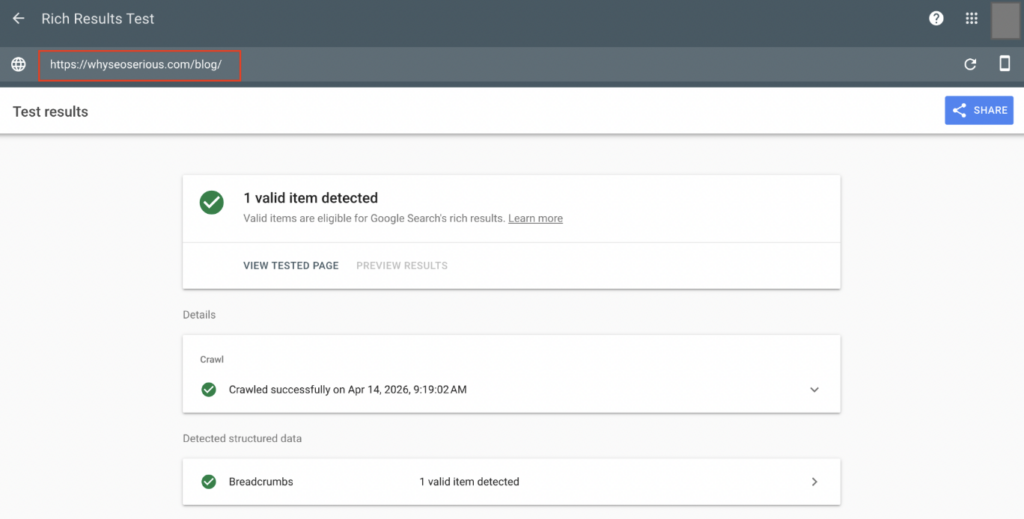
Remember those rich snippets we showed you earlier? We explained how adding schema markup code helps Google identify the correct information to display in rich snippets. If you need to test whether your website supports rich snippets, say no more. Google offers a free Rich Results Test tool for this purpose.

Just enter your URL, wait for the test to complete, and you’ll get your results. Once again, we tested our blog and are proud that it got excellent results.
Conclusion
With all you’ve learned about schema markup, we await your website’s rich snippets on Google search results. Schema markup is one of the most subtle yet effective SEO tools you can leverage to build traffic.
If implementing schema markup sounds too technical, why not hand it over to the professionals, like us? Why SEO Serious is a professional agency that handles your technical and on-page SEO elements. Staffed with experienced professionals, we provide full-stack SEO services to elevate your website’s search rankings. Contact us today to see how we can help.