Contents
Your ideal customer is somewhere searching for products to buy on Google. That new piece of clothing, a new pair of jewelry, and a new collection of stationery – people are frantically searching for the best options on Google. How do you position your online store to appear in the top search results and attract these people? This guide is your answer. Ahead lies a detailed guide on optimising e-commerce sites for high search rankings and increased organic traffic.
What is e-commerce SEO?
E-commerce SEO refers to the steps taken to optimise your online store for higher search rankings. When people search for the latest boots, bags, accessories, and more, e-commerce SEO helps your chances of appearing in the top three search results.
How e-commerce SEO differs from traditional SEO
| E-commerce SEO | Traditional SEO |
| SEO for e-commerce focuses on transactional, long-tail keywords. | Traditional SEO often focuses on broad, short-tail keywords. |
| Prioritises product descriptions, category pages, and user-generated content (e.g., product reviews). | Prioritises blog posts and articles for content. |
| Effectiveness is measured directly by product sales. | Effectiveness is evaluated by page views, conversions, and engagement. |
Why SEO is important for e-commerce websites
SEO drives organic traffic for retail websites. It boosts your site’s visibility in search engine results pages (SERPs), attracting customers searching for your products.
SEO is cost-effective compared to paid search and social media ads. You may spend initially, but you won’t have to run recurring ad campaigns to maintain your traffic levels over time.
Although paid ads still work, SEO efforts can be relied on when you’re not running ad campaigns. By targeting the right keywords, using schema markup, having in-depth content, and following other recommended e-commerce SEO practices, you can attract high-intent visitors at lower costs.
How SEO helps increase sales and conversions
An effective e-commerce SEO strategy drives high-intent traffic to your site. It links customers seeking exactly what you offer to your site, and they’ll often proceed to checkout. For instance, Company A sells training shoes, but not other shoe types. With the right SEO strategy, they’ll attract customers seeking exactly training shoes, not those seeking generic shoes that’ll end up leaving the website.
Technical SEO involves optimising site speed, mobile-friendliness, and visual cohesion. These factors keep users on a site longer, and they’ll somehow find new products to add to their carts.

How e-commerce SEO works
SEO for e-commerce websites revolves around key components like:
- Keyword research. Identifying the high-intent, long-tail keywords to focus on (e.g., “comfortable hiking shoes for women”). Long-tail keywords signify searchers with high intent to purchase an item.
- On-page optimisation. Adding meta description and title tags on each page. It also includes adding descriptive alternative text for every product image.
- Technical SEO. Optimising sites to load fast and adjust seamlessly to smaller mobile screens.
- Navigation. Making your product catalog easy to navigate, with clear menus and submenus for different product categories.
- Schema markup. Inserting schema markup code to define specific entities on your site, e.g., to define a product and its price tag, for search engine crawlers.
- Content marketing. Creating buying guides, blog posts, how-tos, and product-related content to attract visitors.
- Link-building. Amassing backlinks from blogs, product review platforms, and similar online stores to build search authority.
Understanding search intent for product searches
E-commerce search engine optimisation relies on understanding intent. Searchers usually have these types of intent:
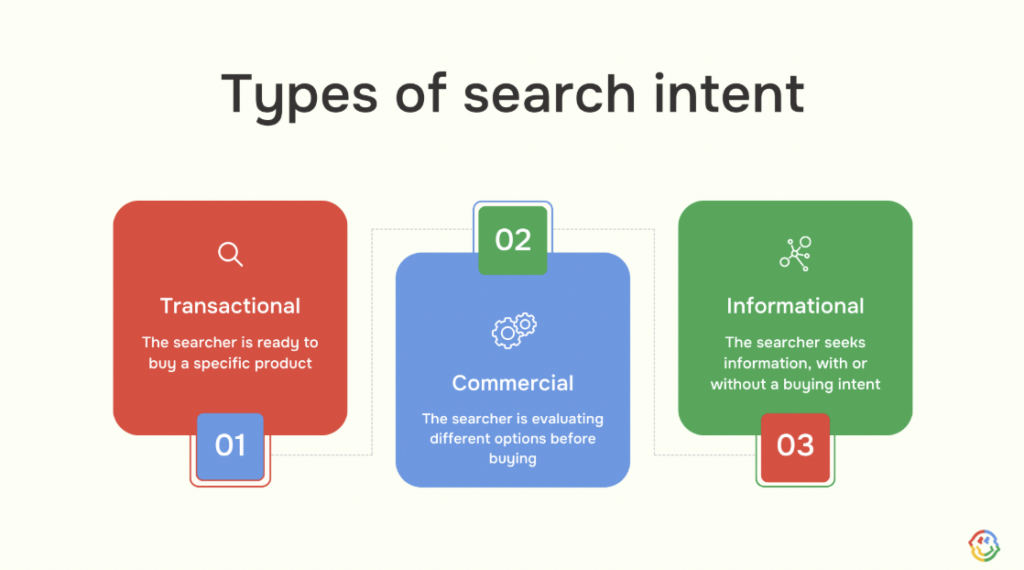
- Transactional (ready to buy). Here, they are ready to buy a product immediately and search for the best option. “Buy,” “Discount,” and specific product names are often present in their search queries.
- Commercial (researching). Here, the searcher is in the evaluation stage, where they compare different products before making their final decision. Examples are “best gym shoes of 2026” or “Best MagSafe iPhone 17 Pro pouches.”
- Informational (learning). In this case, users mainly seek information, rather than a direct purchase, e.g., “How to change my iPhone screen guard.” However, your content can still convince them to buy a product.
E-commerce stores need content that resonates with these types of search intent. This way, your brand can attract customers, including those who were just comparing options or seeking information.
Key ranking factors for e-commerce stores
Outranking competitors on search results is always the goal for e-commerce businesses. But you’re probably wondering how to do this. What even determines search rankings in the first place? Here are the key factors:
- Informative content. Creating content that aligns with search intent.
- Page speed & mobile-responsiveness. 60% of online traffic originates from mobile devices, so search engine algorithms prefer sites that are highly optimised for mobile devices. Algorithms also value sites that load fast, so you don’t want to be that site that takes more than 3 seconds to load.
- On-page optimisation. Sites with clear meta descriptions, title tags, schema markup, internal linking, and short URL structures are search engine darlings.
- Backlinks. Getting backlinks acts as a ‘vote of confidence’ for your e-commerce site. It’s like other sites introducing you to search engine algorithms and verifying your legitimacy. Sites with backlinks enjoy a competitive advantage on search results pages.
- High-quality visuals. Use high-quality product images and videos to gain a competitive advantage. Visuals should look like they were shot on high-definition cameras, not blurry like those taken with 2000s smartphone cameras.
5 tips for successful SEO in e-commerce
Want to make the best of your e-commerce SEO strategy? Here are some tips to note:
- Conduct thorough keyword research
Optimisation starts with researching the right keywords to create content for. These keywords signify the search intent your content will respond to.
SEO tools like Semrush and Google Keyword Planner have made keyword research easier. They let you find trending keywords to target or unique long-tail keywords based on your ‘seed’ word and audience location.
Identify commercial and transactional keywords
- Commercial keywords are used by searchers evaluating product options, such as “best Android phones with sharp cameras” and “best Bluetooth speakers with long battery life.”
- Transactional keywords are used by searchers who have researched, settled on a product, and are willing to buy immediately, such as “buy Samsung Galaxy Fold” or “buy JBL Bluetooth speakers.”
With SEO tools like Semrush, identify the top commercial and transactional keywords in your niche. These tools let you filter trending keywords by location, ranking difficulty, and search volume, so you can find the exact keywords used by your target audience.
Analyse competitor keywords
Imitating your competitors might feel like hacking the system, but it’s an effective strategy. Your top competitors dominate search rankings because they target the right keywords, so copying from their strategy helps a lot. Of course, you don’t have to copy them verbatim. It’s more like, use them as an inspiration.
SEO tools can automatically identify your competitors’ top keywords. Simply enter a competitor’s URL, wait for the scan to complete, and you’ll see a detailed list of the keywords incorporated into your rival website’s content.
Optimise for conversational and long-tail keywords
Long-tail keywords are highly specific phrases (of 3+ words) that buyers search for. They’re characterised by very high intent, with searchers often ready to buy a product on the spot. Use SEO tools to identify the long-tail keywords in your niche.
With tools like Semrush and Ahrefs, simply enter a seed word and a location, and you’ll see the top long-tail keywords related to that seed word that people in your selected location search for. For example, if “TVs” is your seed word and the U.K. is the chosen location, the results can be:
- Best 32-inch OLED TVs for gaming.
- Refurbished 4K smart TVs with a U.K. warranty.
- Best TVs for PS5 in the U.K.
2. Improve on-page SEO
On-page SEO entails optimising individual web pages to get higher search rankings. It’s a bit technical, but it isn’t complicated. Each page should have the following:
- Alt text for images.
- Short and user-friendly URLs.
- Precise product descriptions.
- Title and meta description tags.
- Headers (H1, H2, H3…) to structure the content logically.
- Internal links.
- Fast loading speed and mobile-responsiveness.
Let’s explore these components in more detail:
Write SEO-friendly product descriptions
Product descriptions should be brief yet engaging. Instead of just listing specifications, describe the product and position it as a solution to a key problem. For example, an eco-friendly iPhone pouch can be described as:
- Protect both your iPhone and the planet with the [brand name] sustainable pouch. Created from 100% natural, ethically sourced wood, this iPhone 16 Pro Max pouch offers a durable alternative to plastic cases. It protects your phone from drops and heavy falls, and the water-resistant exterior helps keep your phone safe on any adventure.
In the above description, the position has been marketed both for its specifications (eco-friendliness) and as a key problem solver (protecting iPhones from drops and falls).
Optimise category pages
Products should be grouped into categories to make them easy to find. For example, if you sell smartphone pouches, have different categories for iPhones, Samsung, Xiaomi, Oppo, and other smartphone brands. This categorisation makes it easier for search crawlers to index your content and for customers to quickly find what they want. The faster users navigate your site, the higher the chances of proceeding to the checkout page.
Use structured data for products
Use product structured data (schema markup code) to define a product’s
- Name
- Image
- Price
- Description and
- Customer reviews for search engines.
Structured data ensures Google indexes the correct data, not any random bits of information present on the product page. This way, intending buyers can see your product’s precise name, image, price, description, and review ratings right on Google, then make a quick decision.
Optimise images and alt text
- Add alternative “alt” text to every image, with the text describing exactly what the product image is about. For example, a picture of an eco-friendly iPhone 17 pouch should have “Eco-friendly iPhone 17 pouch from [brand name]” as its alt text.
- Images should also have descriptive filenames, like sustainable-iPhone-17-pouch.jpg.
- Compress images to their smallest possible sizes (without sacrificing quality). Smaller-sized images help websites load faster.
- Use high-quality images, ideally those illustrating the product’s use case. For example, a piece of clothing can include model photos. If you can’t afford professional model photoshoots, AI tools like Claid can do the trick.
Create SEO-friendly URLs and title tags
Your URLs should be short, descriptive, and separated by hyphens. Example.com/seo-friendly-url is a sample SEO-friendly URL, not Example.com/these-are-the-seo-friendly-urls-you-can-choose-from-for-your-website. The latter is much longer and overstretches what can be described in a few words.
Ideally, URLs should be under 60 characters without spaces and should include relevant keywords.
3. Build an SEO-friendly architecture
SEO-friendly online stores are structured with a clear hierarchy that search crawlers can easily understand. They are also optimised for speed, mobile-friendliness, and security. Let’s explore these factors more:
Create a logical site structure
Use a logical structure to organise content hierarchically. Create a pyramid-like structure to group webpages into categories and subcategories. Suppose you sell shoes: you can have main categories like men and women. Then, each category will have subcategories like boots, loafers, heels, and sneakers. These subcategories can also have their own subcategories, creating a clear hierarchy for users to navigate.
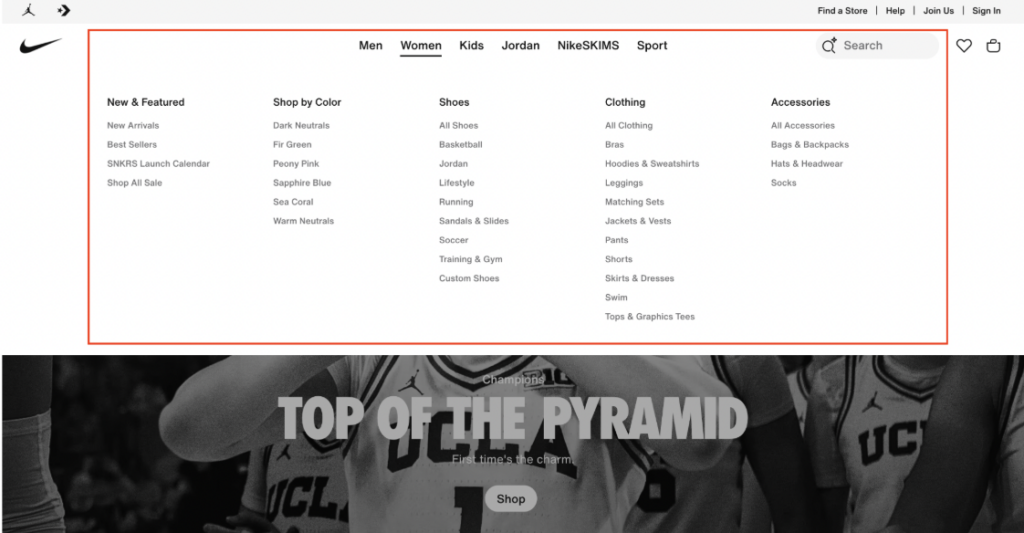
Source: Nike.com
Internal linking for e-commerce
On product pages, insert links to related products to improve discoverability. For example, a “users also purchase” section can show related accessories that people often buy along with a piece of clothing. This internal linking allows cross-selling opportunities. You’d be surprised how many people would buy a relevant product suggested to them.
Internal linking also helps search crawlers discover pages faster. Think of the links like pointers on a map, telling search crawlers which pages to index on your website.
Improve page speed and Core Web Vitals
Google uses three key metrics, called Core Web Vitals, to measure a webpage’s technical performance. Pages with higher scores get better rankings. They are:
- Largest Contentful Paint (LCP). The time it takes for the largest image or text block on a page to load completely. 2.5 seconds or less is the ideal score.
- Interaction to Next Paint (INP). The latency (delay) between a user interacting with a page element and the response. For example, when someone clicks on a button or taps on a link, how long does it take to get a response? 200 milliseconds or less is ideal.
- Cumulative Layout Shift (CLS). How often does page content shift unexpectedly while loading? Such shifts can disrupt the user experience, so the fewer, the better. 0.1 or less is the ideal CLS score.
With Google’s free PageSpeed Insights tool, you can measure the Core Web Vitals of any webpage. You’ll quickly know if any webpage needs adjustments to get better search rankings.
Ensure HTTPS security
Your website needs an HTTPS certificate: it’s kinda non-negotiable in online store SEO. Websites without HTTPS protection face all possible disadvantages for ranking on Google. You’ll hardly find them on the first, second, or even third pages.
HyperText Transfer Protocol Secure (HTTPS) is a protocol that protects data in transit between your website server and a user’s browser. Remember that customers enter their card details, house address, and other personal details on your e-commerce site. If these details are insecure, there’s a big problem.
Maintain XML sitemap and indexing
Imagine visiting a new city with endless things to explore, then wondering where in the world to start from. Then, you get a tourist map pointing you to the top destinations in the city, and your trip gets easier. Flip the script and imagine that person is a search crawler, and the city is your website. An XML sitemap helps crawlers navigate your website and index the right pages.
You can generate an XML sitemap with free tools like XML Sitemaps Generator or MySitemapGenerator. Then, upload this sitemap to Google Search Console and Bing Webmaster Tools. Sitemaps can be reuploaded whenever you change your website’s structure.
4. Leverage content marketing
Creating in-depth content helps attract visitors from search engines. Someone could search for something related to your product, read your blog post, and begin browsing your catalog. Next thing, they’ve added a few products to their cart and proceeded to checkout. Let’s explore effective content marketing strategies:
Create blog content and guides
Add a blog section to your e-commerce site, then post content related to your products. For example, a site selling gaming accessories can write posts like “5 best gaming headsets with surround sound,” “Is an ergonomic keyboard worth it?” and “The ultimate gaming setup: what accessories do you need for a clean look?”
Remember the long-tail keywords we advised targeting earlier. You can write how-tos, listicles, and informative guides based on these keywords. Quietly insert your products into these guides, and some visitors will eventually buy them.
Focus on search intent
Content should revolve around search intent, like the long-tail keywords we mentioned just above. Create guides that respond to what people are searching for, not just any topic you like. Use SEO tools like Semrush to identify the top keywords and create content for them. SEO is data-driven, not instinct-driven. Patterns change rapidly, so always check the data to observe the latest trends.
Promote content
After publishing blog posts, promote them on social media to drum up attention. A post could go viral on social media, draw people to your blog, and some visitors will convert into customers. Other customers can reshare posts, and soon enough, trending blog posts become a hit on search results pages.
Enhance E-E-A-T
E-E-A-T stands for Experience, Expertise, Authoritativeness, and Trustworthiness. It’s Google’s framework for evaluating content quality.
- Experience demonstrates having first-hand, personal experience with the topic. Provide first-hand opinions and original insights to generate this. It should be more of “I tested this product and found it this way,” not “This product is known to be this way.” The former signifies an active voice gained from first-hand experience.
- Expertise highlights your credentials, e.g., author bios and links to published works.
- Authoritativeness refers to your site’s reputation, which can be developed by getting positive reviews.
- Trustworthiness focuses on the content accuracy (with respect to industry consensus). You can get high scores by creating content that precisely answers user queries and cites credible external sources.

5. Build backlinks and brand authority
Have you ever introduced a buddy to your group, telling them that he’s the real deal? That’s how it feels when other websites place links to your site – they’re telling search engines that you’re the real deal.
Amassing backlinks from relevant, high-quality sources boosts search rankings. Search engine algorithms consider sites with quality backlinks more important, so you should put much effort into getting them.
- First, create informative guides, filled with infographics and original insights, that people will naturally want to link to.
- Find related websites, check their contact information, and politely ask for a backlink exchange. It doesn’t hurt even if your website is just a few weeks old.
- Offer free tools (like calculators and file converters) that people direct others to.
E-commerce SEO tools
We’ve mentioned several tools that help with SEO for e-commerce websites, namely Google Search Console (GSC), Semrush, and Ahrefs. Let’s learn more about these tools:
Google Search Console (GSC)
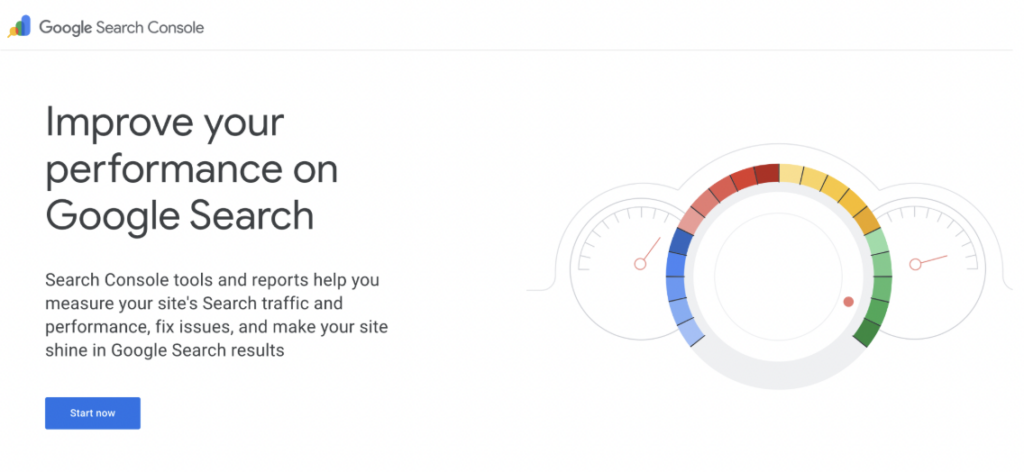
Google offers a free Search Console tool to help website owners monitor their search performance. It shows
- Which pages are indexed, which are not, and the reasons for some pages not being indexed. You can then correct these errors and ask Google to reindex your site.
- Total clicks, impressions, and click-through rates (CTRs) for specific queries.
- Your site’s loading speed, visual stability, and interactivity.
- The number of backlinks and all the webpages from which the backlinks come.
You can also upload sitemaps to Search Console, helping Google’s crawlers to index your content quickly.
Semrush
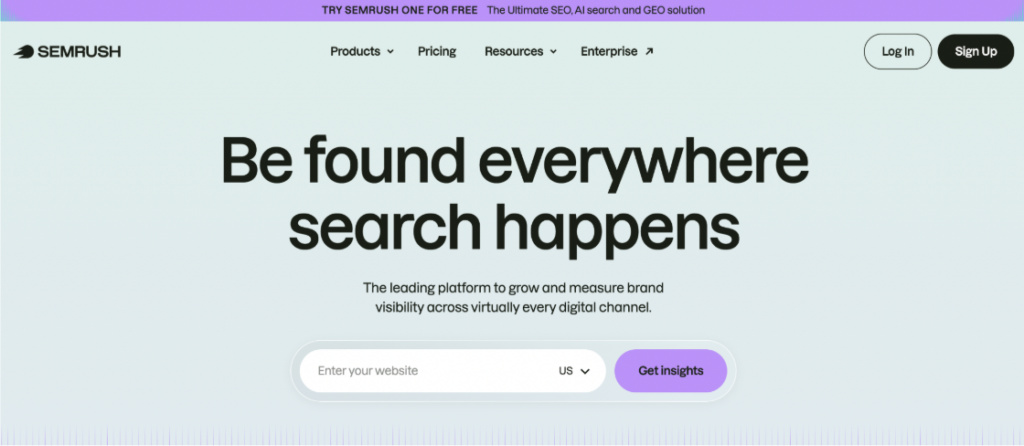
Semrush is a comprehensive SEO tool with various features:
- Keyword research. You can find trending short-tail and long-tail keywords based on a seed word, location, and niche.
- Technical audit. Scan your website to discover technical errors holding back search rankings. It could be something as little as a missing meta description tag.
- Competitive analysis. Enter your competitor’s web address and analyse their targeted keywords, backlinks, and content strategy. Don’t hesitate to learn from a rival’s SEO strategy– it isn’t copyrighted material.
- AI visibility. Track mentions of your website on ChatGPT, Claude, Gemini, and other AI chatbots.
Ahrefs

Ahrefs offers similar features to Semrush. Word on the street is that Ahrefs excels more at backlink analysis, while Semrush excels more at comprehensive keyword research. Key Ahrefs features include:
- Backlink monitoring. Get a detailed list of all sites linking to yours. You can also run the same analysis for your competitors’ websites.
- Site audit. Scan your whole site to detect technical errors affecting SEO rankings.
- Content Explorer. Find content ideas based on social trends.
- Rank Tracker. Monitor your site’s rankings for specific long-tail keywords. That’s how you know whether you’re outranking or trailing the competition.
How to measure e-commerce SEO performance
So you’ve implemented the recommended steps above. How then do you measure if you’re getting the desired results? It all boils down to looking at some key metrics, described below:
Tracking keyword rankings
Track your rankings for the short-tail and long-tail keywords you create content around. With Google Search Console (GSC), you can track your website’s rank for specific keywords over time. The aim is to get better rankings as time goes on.
Semrush allows in-depth competitive tracking, unlike GSC, which mostly tracks your own rankings. You can compare rankings head-to-head with top competitors, with the ultimate aim of climbing the leaderboard.
Monitoring organic traffic
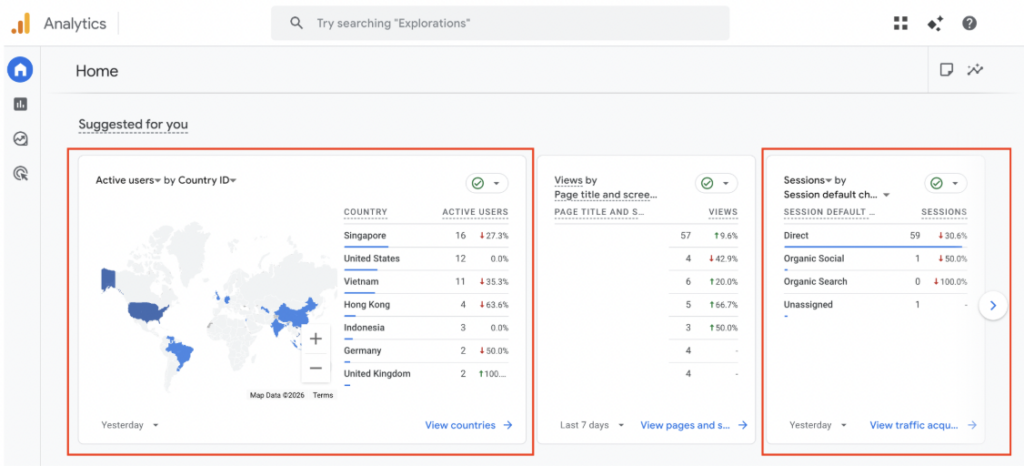
Increased organic traffic is a sign of an effective SEO strategy. Monitor your organic traffic and compare it to past results and also your competitors. The aim is always to see improved traffic over time.
With the free Google Analytics platform, you don’t need to worry about monitoring traffic. It shows your traffic stats in detail, including the location, referral source, and average time spent on page. You’ll know exactly which traffic came from search engines and which came from other sources.
Measuring e-commerce conversions
Many people may visit your website, but what matters is how many of them eventually buy products from your store. The percentage of buyers vs. visitors represents your sales conversion rate.
Closely watch your conversion rates, as an effective SEO strategy always increases this metric. It may take 3 to 12 months to see optimal results, so monitor conversions in the long-term. Google Analytics is a good tool for monitoring conversions, and you can also do that from your e-commerce provider’s backend.
Common e-commerce SEO mistakes
People aren’t perfect, so they often make mistakes when implementing SEO for e-commerce websites. You can learn from these mistakes so that you don’t have to spend valuable time redrawing your SEO strategy. Common mistakes to avoid include:
Duplicate product content
E-commerce sites can unintentionally include duplicate product descriptions. For example, copying the exact description from a manufacturer and placing it in your website causes this mistake. With the same description on your website and that of the manufacturer, search engines could flag them as duplicate content, which reduces rankings.
To avoid this issue, create unique descriptions for every product. The description should position the product as a problem-solver. We’ve advised imitating a bit, but it applies to SEO strategies, not product descriptions.
Poor site structure
We’ve advised structuring products into categories and subcategories to enable easy navigation. However, we’ve visited some sites that put all products in a “Shop All” section, with no categories or hierarchy. This mistake can bury products too deep for customers and search crawlers to find them.
Always have product categories and subcategories, with a navigation menu that leads to all available categories. Also, place internal links around your website to point customers to other products.
Slow website speed
Have you waited more than 5 seconds for a web page to load? Maybe. How about more than 10 seconds? At this point, you quickly reach for the X button. That’s how visitors feel if your web page takes too long to load. To get the best results, pages should load completely within seconds.
Earlier, we mentioned compressing visuals to their smallest possible sizes to make them load faster. Other tips include
- Using a content delivery network (CDN) that loads content from servers closest to the visitor’s location.
- Minimising usage of CSS and JavaScript code.
- Removing unnecessary URL redirects.
Missing structured data
You can have all the right product data, but search crawlers struggle to find it if it isn’t indicated by schema markup code. From prices to descriptions, reviews, and product images, schema markup indicates exactly what search crawlers should index and display to users. Otherwise, they might somehow take pricing information from another product displayed on the same page.
Schema markup lets search engines capture your product information and display it word-for-word in search results. This way, customers get the full information to quickly make their decision. There’ll be no second-guessing on their part.
Conclusion
E-commerce SEO isn’t a “set-it-and-forget-it” project. It’s a long-term process that takes longer than a computer running Windows 95, but the patience eventually pays. Yet, if patient waiting isn’t your thing, you can offload e-commerce SEO to professional agencies, like Why SEO Serious. We’ll take care of the strategy and implementation, while you sit back and relax.
At Why SEO Serious, we offer comprehensive SEO services for e-commerce businesses, helping your products climb to the top of search results pages. Contact us today to see how we can help your online business grow.
E-commerce SEO FAQs
What is e-commerce SEO?
E-commerce SEO refers to the strategies you apply to improve your online store’s search visibility. It’s what you do to help your store appear on the first page when customers search for what you sell.
How long does e-commerce SEO take?
It can take 3 to 12 months to get the maximum results from your SEO efforts. That’s longer than you may expect, but SEO is a long-term process, not a quick-win strategy. Exercise some patience as you implement the recommended SEO steps.
What are the most important e-commerce SEO factors?
They range from keyword research to internal linking, structured data (schema markup), optimising site speed & mobile-responsiveness, XML sitemaps, competitive analysis, and more.
Is SEO better than paid ads for e-commerce?
SEO takes longer to achieve results than paid ads. However, with SEO, you can achieve more with less spending than paid ads. After your initial SEO efforts, you don’t have to spend money to maintain higher traffic levels, unlike paid ads. SEO builds long-term search authority, while paid ads achieve quick results, but with no guarantee of the results holding on when you stop paying for ads.