Contents
External linking
What does an external link do?
- Sends visitors to another page on your website
- Points to a page on a different domain
- Makes Google instantly rank you #1
- Sends your traffic into the abyss forever
The final answer is B. And no, that doesn’t mean you’ve just handed your audience to the competition with a gift basket. An external link takes users from your website to another domain. And while some SEO specialists worry about sending traffic elsewhere, linking out isn’t something to fear. Here’s a guide to how external linking works and the dos and don’ts of this strategy.
What are external links?
External links are hyperlinks pointing from your website to another website. They point users to extra informative resources and show how your content relates to other web pages. For example, a blog post about SEO trends can link to a recent search trend report published by Google, highlighting further information for the reader to explore.
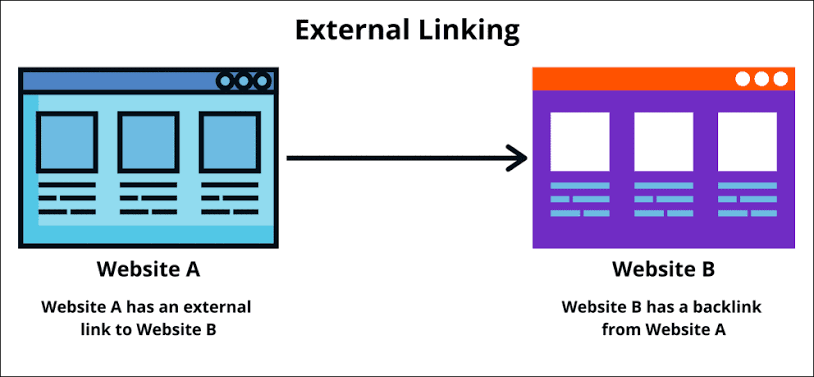
| Site A | Site B |
| Site A inserts an external link to Site B | Site B gets a backlink from Site A |
Internal vs. external links: Key differences
Internal links are the inverse of external links. Instead of pointing to other websites, they direct users to other pages on the same website. For example, in a blog post about new SEO trends, you can link to similar posts published before on your website, letting users compare past trends to current ones.
| Internal links | External links | |
| Purpose | Encourages users to stay longer on your website and helps search engines discover new pages. | Provides extra value for readers and shows how your content relates to other websites. |
| SEO impact | Establishes topical relevance and spreads link equity across your domain. | Signal context to search engines and displays high editorial standards. |
| Anchor text | Keyword-rich or exact-match anchor text for the page being cited. | Descriptive, natural anchor text for the resource being cited. |
| Risk level | Low risk. | Higher risk, as linking to spammy sites can dent search rankings. |
Dofollow vs. Nofollow vs. Sponsored vs. UGC
External links have rel attributes that tell search engines how to treat them from your website’s perspective. The attributes can be:
- Dofollow. Gives full site authority to the linked website.
- Nofollow. Don’t pass site authority to the linked site, i.e., the link shouldn’t be counted as an endorsement.
- Sponsored. Denotes a paid link placement, with no organic ranking credit. It prevents search engines from penalizing sites that buy link placements.
- UGC. UGC stands for User Generated Content, highlighting links placed by users, not directly endorsed by the site owner.
Do external links help SEO?
External linking is part of search engine optimization (SEO), improving trust and authority for your site. It helps search algorithms understand your page’s content and highlights the content as well-researched and aligned with Google’s E-E-A-T (Experience, Expertise, Authoritativeness, and Trustworthiness) guidelines. You aren’t “leaking juice” to other sites but, instead, building contextual relevance for your own site.
Direct ranking signal: PageRank flow
PageRank is an algorithm used by Google to help determine, well, page rankings. Someone will say it’s named after a “web page.” True, but it’s also named after Google co-founder Larry Page. What a coincidence, or maybe a true case of nominative determinism.
Note that PageRank isn’t the only algorithm Google uses, but one of many. It works by evaluating the number and quality of links to a website, with the assumption that informative websites receive more links from other sites.
PageRank flow describes the movement of authority from one web page to another through external links. If your page has high authority, linking to other sites means sharing that authority, so always consider which sites you link to. Insert external links to content-rich sites providing valuable information, not spammy sites with little value.
Yet, if you don’t want to share authority with a site, use the nofollow rel attribute so that Google doesn’t count the link as an endorsement.
Indirect benefits: Context, crawling, and credibility
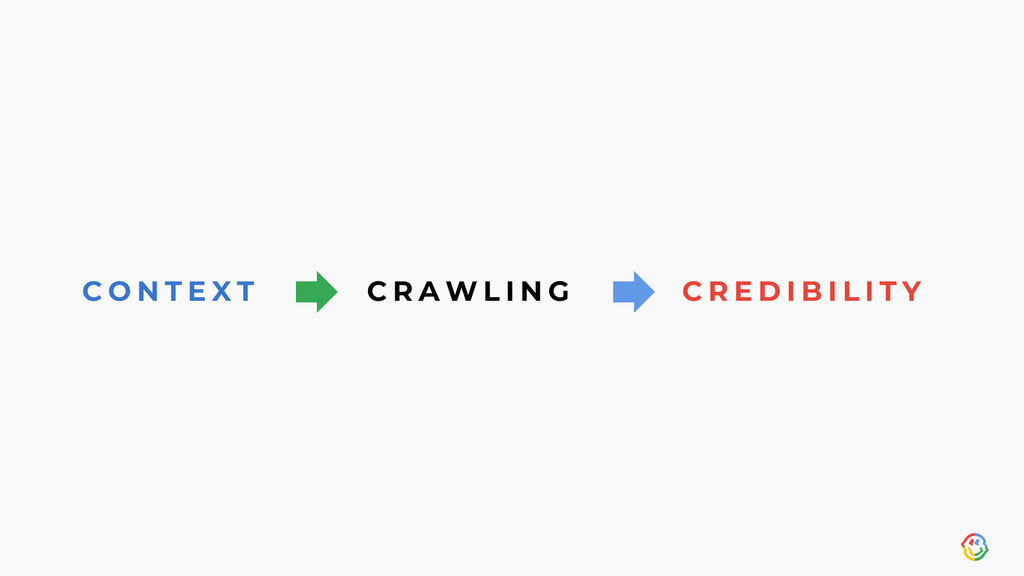
External links establish contextual relevance, telling search algorithms what your page is about and which content it relates to. In turn, this helps search bots crawl your website faster and spend their crawl budget on the most relevant pages, not random ones. It also boosts general search credibility, increasing the chances of ranking in the top five for relevant queries.
How do external links help AI agents cite your content?
Pages with two or more outbound links are more likely to be cited by AI agents, which people increasingly use to find information in addition to conventional search engines. This maps back to the contextual relevance we’ve discussed. Citing trusted sources makes it easier for AI crawlers to validate your content and then suggest it as an answer to user queries. A paragraph with 2 to 3 relevant outbound links is more likely to appear in AI answers than one without links.
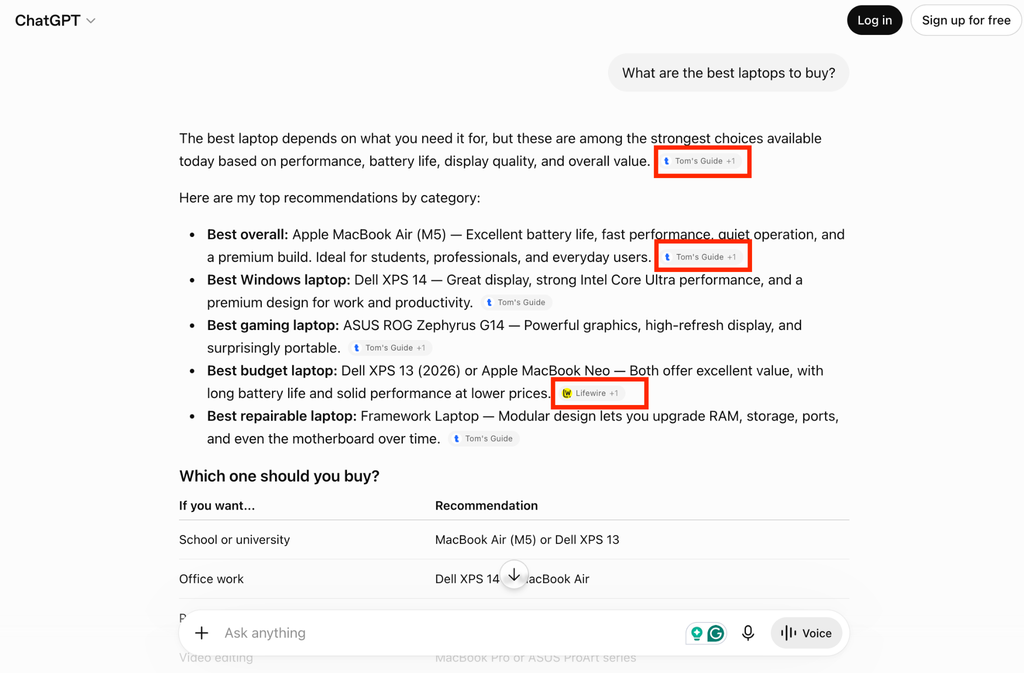
Source: ChatGPT/OpenAI

External link best practices for 2026
An SEO external link strategy is effective, but only if done correctly. When linking to other websites, prioritize relevant, authoritative domains, use descriptive anchor text, and use the proper rel attributes. Let’s dive deeper into these best practices.
Link to relevant and topically related sources
Link only to pages relevant to yours. The hyperlinked pages should be related to the topic discussed on your website, like citing a statistic, an infographic, or a detailed comparison.
For example, in a page discussing SEO trends in 2026, we can cite a recent blog post published by Google, highlighting increasing search queries for local running clubs, mahjong lessons, and other outdoor social activities. However, citing another blog post talking about Google’s new selfie sign-in feature would feel off because it doesn’t directly relate to the topic of SEO trends in 2026.
| Topic | Right link | Wrong link |
| SEO trends of 2026 | These Google Trends show people really want to touch grass | Introducing selfie for sign-in: a new, easy way to access your Google Account |
| Why? | It’s directly related to search trends of 2026, making it a valuable resource for readers. | The page has no direct link to SEO trends, so it can confuse readers and search algorithms. |
Prioritize authoritative domains
Prioritize links from domains that post accurate, recently updated content and have good search reputations. Avoid linking to spammy sites with sparse or inaccurate information, as this reflects negatively on your website. Algorithms evaluate your website partly based on what you link to, so choose sites that reflect what your own site should be seen as.
Prioritize updated information that readers can learn from. For example, when discussing SEO trends of 2026 above, we chose to link to a July 2026 Google report showing increasing queries for social outdoor activities, not an outdated report from 2019.
Use descriptive natural anchor text
The anchor text, which the link is attached to, should tell readers exactly what the linked page is about. It should be descriptive, such that readers quickly understand the page you’re pointing them to.
For example, to link to this page – Why dogs chew your shoes? Here’s what science tells us:
We can say, “Dogs chew shoes for many reasons, so don’t be surprised if your beloved Golden Retriever does that,” with the bolded text being the anchor. It’s a natural description of exactly what’s on the page we’ve linked to.
However, if we say, “Dogs chew shoes because it’s normal for them..” it doesn’t sound descriptive enough. It tells “what”, but doesn’t describe the “why.”
Set correct rel attributes
Use the right rel attribute, which we explained earlier (Dofollow, Nofollow, Sponsored, and UGC). The attribute tells search engines how to treat the external link, particularly whether to assign organic ranking authority to it.
| Attribute | Description |
| Dofollow | Assign organic search authority. |
| Nofollow | Don’t assign organic search authority. |
| Sponsored | Paid link placement. |
| UGC | User-generated links not endorsed by the website itself. |
Link out to fresh and updated content
Prioritize recent, updated webpages, not old webpages that haven’t been updated for long. These pages contain the most relevant information that people can relate to, particularly when discussing statistics and figures that change frequently. For example, in a blog post about economic trends, you’d want to cite the most recent government GDP growth data, not old data that’s no longer relevant.
Where and how often to add external links
There’s no specific answer to where and how often to place external links, but always note that quality trumps quantity. It’s not about the number of links you place but how valuable they are to readers. Proper placement varies based on the type of webpage.
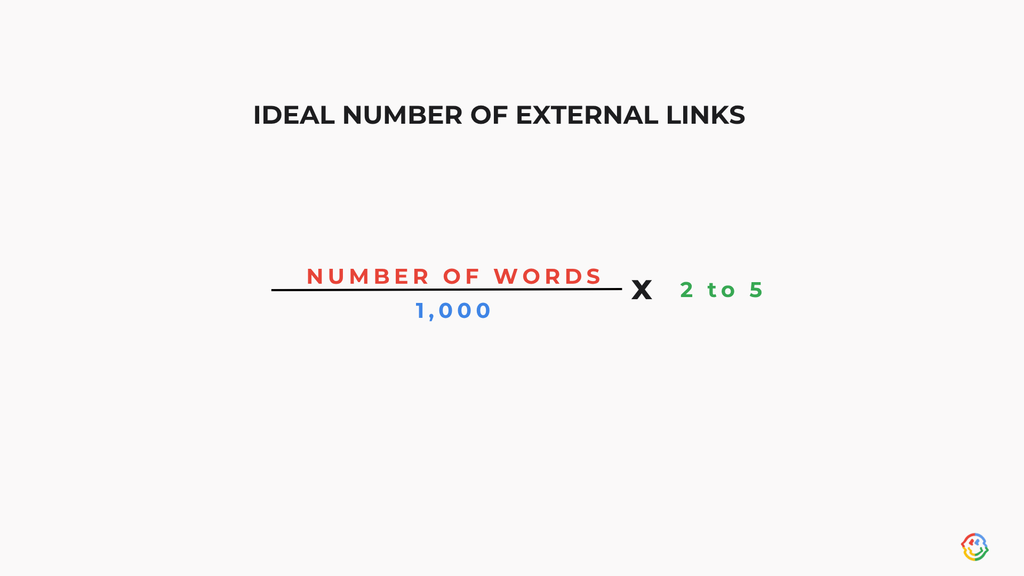
Blog posts: 2–5 links per 1,000 words
For typical blog posts, adding 2 to 5 links per 1,000 words is a good range. For instance, if your post is 5,000 words, 10 to 25 external links work well. The links point readers to additional content they can read later and help search algorithms understand the blog post.
Pillar pages and product pages
For product pages, having 1 or 2 external links is a good range. These pages are usually short and lean towards promotional content. You can add the links in the product description, specifications, or FAQs section.
For example, a product page for a piece of clothing can link to an external size guide. This size guide helps users convert measurements, which differ across regions, accurately, and pick the right-sized clothing.
How to audit your external links
You should audit external links quarterly, ensuring the links are still active, and update older links with newer ones when needed. Otherwise, you may end up with dud links leading to nowhere or outdated links having irrelevant content.
Find broken external links
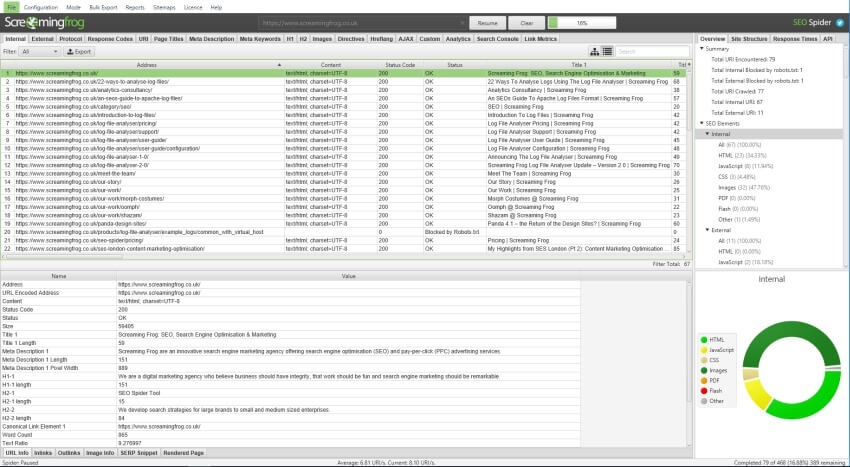
Look for links that no longer work. Maybe the page owner deleted the content or changed the URL, so the link now leads to a 404 error not found page. You don’t have to do this manually. Instead, SEO tools like Screaming Frog scan your whole website to identify broken links, then display these links in a detailed report similar to the one below:
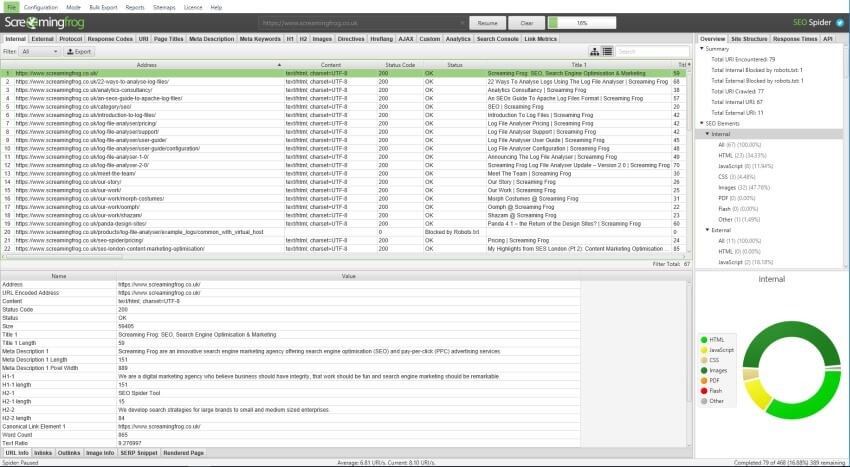
With the detailed report, you’ll know exactly which external links to replace or delete permanently.
Check for lost or changed pages
Check for pages with URLs that have been changed by the website owners. For example, a blog post you cited may have been merged with another post, resulting in a different URL.
Tools like Screaming Frog also help you scan for changed or lost pages. Then, you can replace them with the new URLs or remove them altogether.
Identify toxic outbound links
Toxic links are low-quality, spammy links you may have mistakenly included in a website. After all, no one perfectly examines all sites they link to. SEO tools like Screaming Frog and Semrush can scan your site for toxic backlinks denting its credibility, and you’ll quickly remove them.
| Red flag (toxic) | Green flag (non-toxic) | |
| What constitutes a toxic backlink? | Low-quality, spammy sites built to manipulate site rankings. | Sites hosting informative, accurate content with original insights. |

Common mistakes to avoid
Publishers often make mistakes related to external linking. These mistakes can dent search rankings, so you should be aware of them and avoid the pitfalls:
Never linking out
The first pitfall is not linking to external pages at all. Some publishers do this out of fear of external links diverting attention away from their content, but this isn’t the case. External links help readers get more information and verify figures. It also helps search algorithms understand the page better and suggest it for relevant queries.
Generic anchor text
Some publishers add external links but use generic anchor text instead of something fine-tuned to the article being linked to. Generic anchor text doesn’t provide context, so the external link won’t help your site rank higher. On the other hand, a descriptive anchor text provides context, helping both readers and search algorithms understand what it’s about. Earlier, we demonstrated how to use descriptive anchor text for external links, so here’s a recap of that example:
| Link | Good anchor text | Bad anchor text |
| Why dogs chew your shoes? Here’s what science tells us | Dogs chew shoes for many reasons, because it’s a natural description of the page we’ve linked to, which discusses the many reasons for which dogs chew shoes. | Dogs chew shoes because it’s normal for them, which doesn’t sound descriptive enough. It tells what, but not why. |
Nofollow on every external link
We understand not wanting to endorse every link, but the nofollow attribute should be used only when necessary. Use it for user-generated or paid link placements. Otherwise, genuine citations should have dofollow links, signaling the site’s authority to search engines.
It’s often said to do to others what you want to be done with you. In this case, you’d want someone linking to your site to make it a dofollow, not a nofollow, helping boost your site’s reputation.
Tools for managing external links
There’s no need to freak out about managing external links and many other SEO aspects. There’s a lot of automation in the SEO space, with tools that help you find good external links and audit existing ones. These are the main ones:
Ahrefs or Semrush
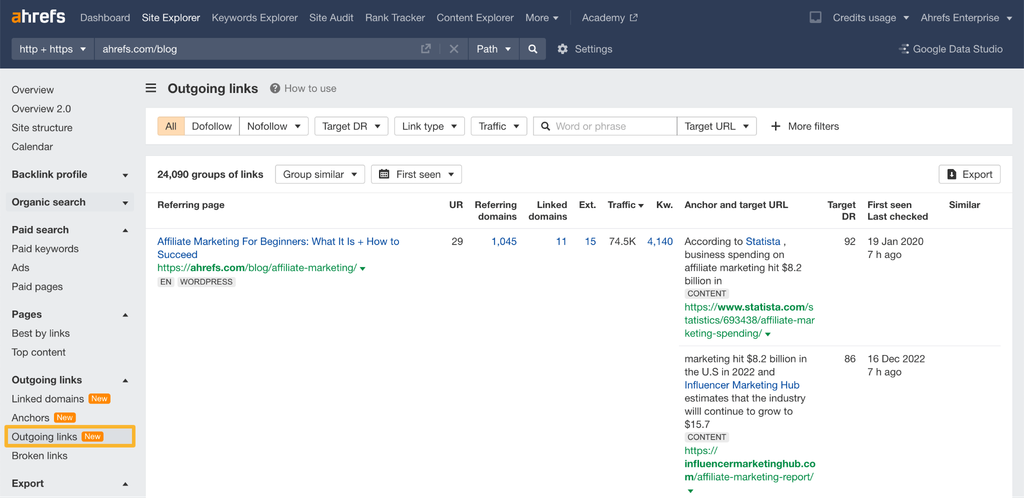
Every SEO professional knows Ahrefs or Semrush. They are all-in-one SEO software suites with many features, including monitoring external links. You can quickly scan your site to see all URLs it links out to, with broken links highlighted so you can fix it. The results are shown in a visually appealing format that looks like this:
Google Search Console
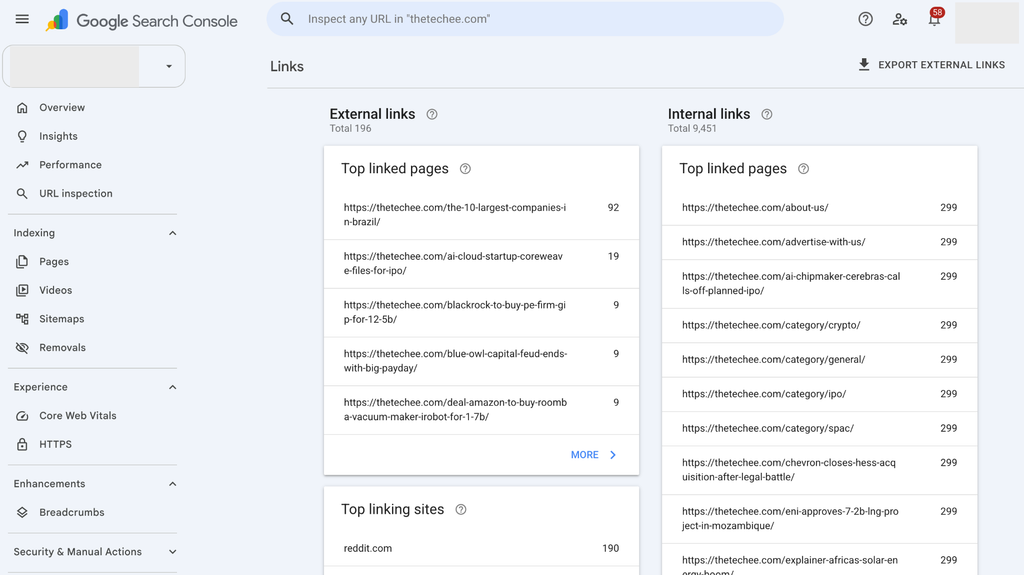
Google, the world’s leading search engine, provides some free tools to help site owners optimize search rankings. Search Console is one of these tools, and it includes an External Links checker. From your Search Console dashboard, you can view all outbound links from your site and their anchor texts. Unfortunately, Search Console lacks a broken links checker, so you’re limited to monitoring external links, but not auditing them.
Source: Google
Screaming Frog
Earlier, we used Screaming Frog as an example when discussing finding broken links. It’s an advanced SEO audit tool that, among many features, scans your website to highlight all external links and those that no longer exist or redirect to other sites. From the report, you’ll quickly know which links to replace.
Source: Screaming Frog
Conclusion
With what you’ve learned so far, you can now leverage external links to grow your site rankings. From choosing the right sites to auditing the links and ensuring everything stays in good shape, we’ve covered the ins and outs of external linking.
External linking is just one part of an effective SEO strategy. You also need many other aspects, including internal linking, mobile-friendliness, security, backlinks, keyword relevance, and more. If you need help implementing a successful SEO strategy, look no further than Why SEO Serious to do that for you. Contact us today to see how we can help.
Book a consultation with Why SEO Serious
FAQs
What is external linking with an example?
External linking means adding a link to another site on your webpage. The external link cites another page containing valuable information for your readers. For example, here’s an <a href=”https://whyseoserious.com/blog/articles/seo-content-strategy-guide/”>external link to our SEO strategy guide</a>.
What is external and internal linking?
An external link points from your website to another domain, while an internal link points from your webpage to another page on the same website. For example, an internal link can direct readers to a related product page or another blog post similar to what they’re currently reading.
What is an external link request?
An external link request is a formal ask for a website owner to place a hyperlink pointing to your own domain. Such inbound links boost your site’s search credibility, so asking for them doesn’t hurt.
How do I use an external link?
You should use external links to direct readers to webpages containing valuable information, or to cite statistics, figures, and infographics that were sourced from other sites.