Contents
SaaS SEO
SEO for a software-as-a-service (SaaS) platform doesn’t follow the generic SEO pattern. Here, the focus is on attracting leads through search engines and nudging them towards free trials and demos, eventually building long-term subscription revenue. How does SaaS SEO work, and what are its dos and don’ts? How do I build an effective SaaS SEO strategy? Look no further than this actionable guide to SaaS SEO for software companies.
What is SaaS SEO?
SaaS SEO entails search engine optimisation designed for software-as-a-service platforms. These platforms sell software under monthly or annual subscriptions, and search engines present a goldmine for attracting users to these subscriptions. The goal isn’t just getting organic traffic, but converting that traffic into paid subscriptions.
How SaaS SEO differs from traditional SEO
| SaaS SEO | Traditional SEO | |
| Goal | To convert organic traffic into paid monthly, bi-annual, or annual subscriptions | Centered on getting organic traffic |
| Keyword focus | Specific niche keywords and comparisons (e.g., Tool A vs. Tool B) | Broad keywords and phrases |
| Key performance indicators (KPIs) | Free trial signups, demo requests, and recurring subscriptions | Page views and online sales |
| Buyer journey | A longer content funnel that covers problems and pitches solutions. | A shorter, faster path to sales |
Why generic SEO fails for SaaS products
The generic SEO content marketing strategy of writing blog posts and building backlinks doesn’t really work for SaaS products. This strategy attracts the everyday reader, but not the people in charge of software decisions at their companies. To attract this cohort, you need content focused on the product itself (what it offers and how it compares to other products). Think of the content as a pitch, telling readers why they should choose your SaaS product over others. The benefits have to be clearly stated.
Why SEO is non-negotiable for SaaS companies
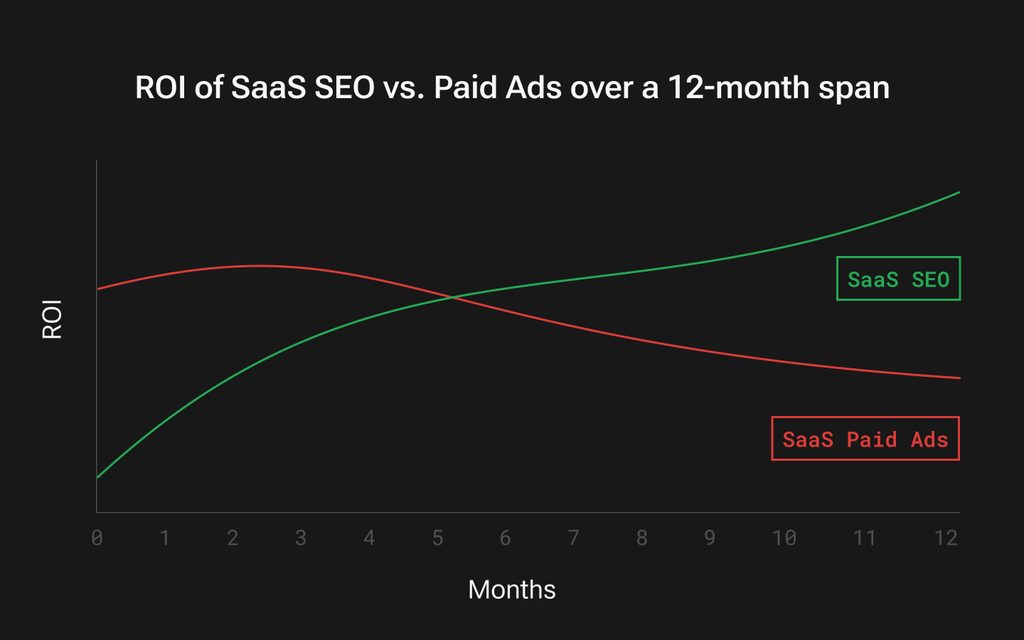
SEO is the most cost-effective way for SaaS platforms to get paying subscribers. Ads work, but the results largely fade after the budget is used up. There’s only so much you can spend on ads without eating into profits, so SEO is non-negotiable for SaaS vendors that want a solid, profitable customer base.
Lower customer acquisition costs over time
SEO allows SaaS vendors to build a customer base at lower cost than search and social media ads. In the first month, SEO may be costly, but the cost-per-customer drops in the ensuing months. Compare that to ads, where the cost-per-customer persists for a long time.
For example, a company may spend $5,000 per month to hire a B2B SaaS SEO agency. In the first month, it’ll likely see few signups, because SEO takes several months to show the best results. However, in the long term, the $5,000-per-month fee can generate a few thousand subscriptions worth $50,000 in monthly revenue.
However, if the company focuses on ads, it’ll need much more than $ 5,000 per month in ad spending to obtain the few thousand subscriptions worth $50,000 in monthly revenue.
Book a call with Why SEO Serious to scale your SaaS business through SEO
Predictable pipeline without ad spend
Ads work, but at higher costs, so much that some SaaS vendors accept spending more on ads than they get in sales. This loss is incurred to first establish a customer base, before switching to SEO to find customers cost-effectively.
SEO provides a predictable revenue pipeline without high ad spending. When established, companies can rely on this pipeline to amass new customers while maintaining profitability.
Defend against AI overviews & zero-click searches
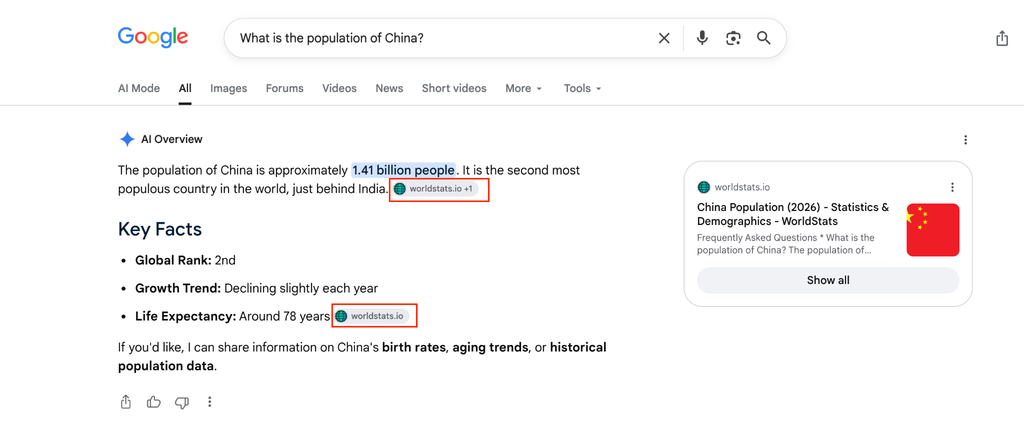
People now click less on search engine results, because AI overviews provide summaries of what they want. A proper SEO strategy helps your SaaS platform get cited in these AI overviews. Even when users don’t click on the citations, a brand mention provides some familiarity, making them receptive to your product later.
The 5-stage SaaS SEO framework
We’ve explained how enterprise SaaS SEO works and why it’s non-negotiable. Then, how is it implemented? What are the steps for executing a proper SaaS SEO strategy? It proceeds from technical SEO > entity SEO and topic clusters > a full-funnel keyword strategy > creating comprehensive, high-converting content > link building. Let’s dive deeper into these stages.
Stage 1: Technical SEO for SaaS websites
Technical SEO is the foundation of your SaaS SEO strategy. Without it, nothing above stands, no matter how excellently it’s designed. These are the technical SEO elements required to build a solid foundation:
Fix crawl budget for large product pages
Google’s search crawlers often waste their budget crawling unnecessary pages. To fix this issue,
- Have a robots.txt file instructing crawlers on which pages to crawl and which to avoid.
- Upload a sitemap that guides crawlers as they navigate your website.
- Add internal links to help crawlers navigate your site.
Think of the sitemap as a digital map guiding you to your ultimate destination. Internal links are those billboards indicating the directions to the next landmark. Robots.txt are those warnings telling you where to avoid. That’s how it feels from the perspective of a search crawler, so you can make their lives easier with the above steps.
Add SaaS-friendly schema
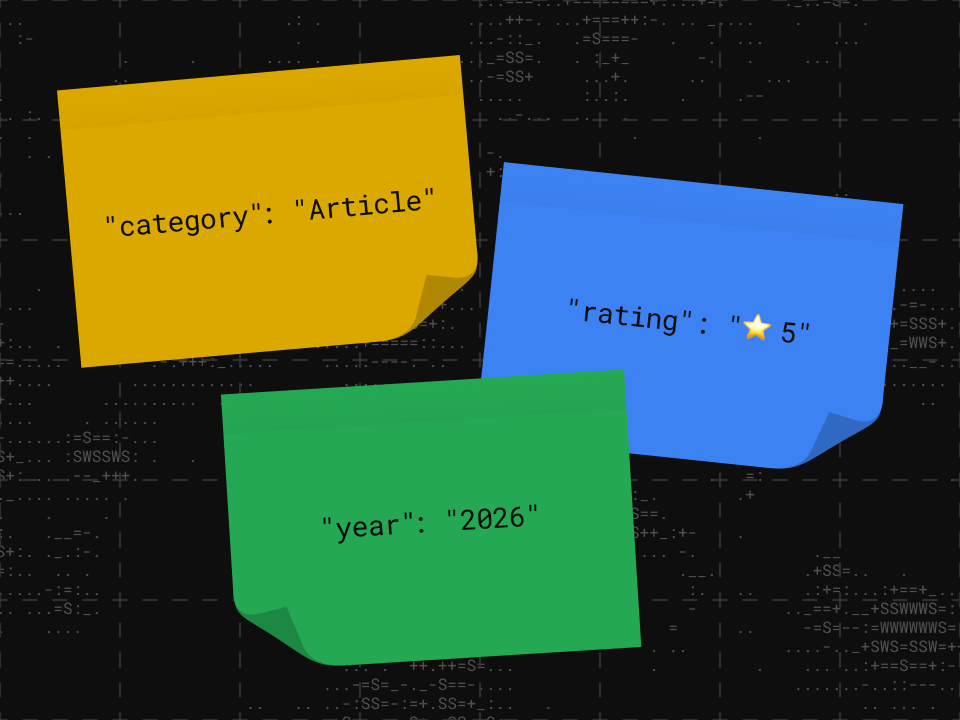
Schema markup code, also called structured data, labels key data on your site for search crawlers. Here’s an example written in JSON-LD:
<script type=”application/ld+json”>
{
“@context”: “https://schema.org”,
“@type”: “SoftwareApplication”,
“name”: “WSS sample SaaS“,
“operatingSystem”: “Web Browser, iOS, Android“,
“applicationCategory”: “BusinessApplication“,
“offers”: {
“@type”: “AggregateOffer”,
“priceCurrency”: “USD“,
“lowPrice”: “29.00“,
“highPrice”: “149.00“,
“offerCount”: “3“,
“priceSpecification”: {
“@type”: “PriceSpecification”,
“name”: “Advanced Plan“,
“price”: “49.00“,
“priceCurrency”: “USD“,
“valueAddedTaxIncluded”: “false”
}
},
“aggregateRating”: {
“@type”: “AggregateRating“,
“ratingValue”: “4.8“,
“reviewCount”: “125“
}
}
</script>
With the above schema markup code, we’ve labeled details including the
- SaaS platform’s name: WSS Sample SaaS.
- SaaS platform’s supported operating systems: Web browser, iOS, Android.
- Type of SaaS platform: Business Application.
- Currency accepted for the SaaS subscription plans: USD.
- Lowest price of a subscription plan: $29.
- Highest price of a subscription plan: $149.
- Number of subscription plans: 3.
- The name of a specific plan: Advanced.
- Price of the specified Advanced plan: $49.
- Aggregate reviews of the SaaS platform: 4.8 out of 5 stars, from 125 reviews.
A search crawler doesn’t need to waste its crawl budget seeking all the above information. We’ve specified it with schema markup code, so the details will be identified immediately, enabling faster indexing. That’s how schema markup boosts search visibility.
Set canonical URLs for feature & pricing pages
A canonical URL indicates the web address you want search engines to display in search results. For example, the same web page may load as
- http://example.com
- https://example.com
- //example.com
In this case, you’d want to point to the secure version – https://example.com – in search engines. This HTML code snippet, (<link rel=”canonical” href=”https://example.com” />), sets a canonical URL that search engines will display.
On all feature and pricing pages on your SaaS website, insert a similar code snippet that tells search engines the canonical URL to display. This prevents web crawlers from wasting their budgets on duplicate pages, and it combines the link power of all duplicate pages (http://example.com, https://example.com, and and //example.com) into the specified page (https://example.com).
Optimise Core Web Vitals on landing pages
Google uses three core metrics, called Core Web Vitals, to evaluate a web page’s technical performance:
- Largest Contentful Paint (LCP). It measures how fast a web page completely loads, and under 2.5 seconds is the ideal score.
- Interaction to Next Paint (INP). This measures how quickly a web page reacts when a user clicks, taps, or types, and under 200 milliseconds is the ideal score.
- Cumulative Layout Shift (CLS). It measures how often page elements move around unexpectedly while loading. Under 0.1 is a good score.
Optimise all product landing pages on your website to pass the ideal scores.
- To optimise web page speed (Largest Contentful Paint, LCP), compress images to their smallest possible sizes without sacrificing quality, remove bulky third-party scripts, and use a content delivery network (CDN) to load content from servers closest to a user’s location.
- To optimise reaction times (Interaction to Next Paint, INP), minimise your heavy code usage and break up long JavaScript tasks into smaller segments.
- To avoid unexpected page element movements (Cumulative Layout Shift, CLS), set explicit size attributes (width and height) for images and video elements, ensuring they don’t fluctuate when loading. Also, avoid inserting dynamic banners, cookie notices, and notifications above existing content; instead, place them in a fixed placeholder box with a designated, non-shifting reserved space at the top or bottom of a page.

Stage 2: Entity SEO & topic clusters
Keywords aren’t really what they used to be anymore. They still matter, but a proper content marketing strategy now centers more on topic clusters around specific concepts (entities).
The idea is that instead of creating content to target isolated keywords, you instead create a network of interlinked content pieces, using a pillar linked to detailed sub-pages. Here’s how.
Map core entities around your category
Let’s say you run a SaaS cloud storage platform. You can choose specific concepts (entities) that your content will focus on. For example, “Enterprise cloud storage solutions” is a fitting entity for a cloud storage SaaS platform.
Building pillar pages + cluster content
From the above example, your pillar page would be “Enterprise cloud storage solutions.” For this pillar page, you’ll write a detailed guide comparing various cloud storage solutions, while subtly pitching yours as the best option.
Then, you can create cluster pages for the following sub-topics:
- Automated cloud backups
- Cross-platform file sync
- Data encryption
- Role-based access control
Each cluster page will dive deep into the topic. For instance, the article about “Role-based access control” will explain how this feature works on cloud storage platforms and why it’s necessary for an organization, then pitch your solution as a cloud storage platform offering reliable role-based access control. You’d create similar content for all the sub-topics, with each linking to one another and the pillar page, “Enterprise cloud storage solutions.”
In this example, a main pillar page like “Enterprise cloud storage solutions” and interlinked sub-topics like “role-based access control” and “automated cloud backups” gives your website ample topical authority. Search engine algorithms will recognize the site as demonstrating clear expertise and authoritativeness on the topic of “Enterprise cloud storage,” making it more likely to be cited in search results.

Apply GEO for ChatGPT and Google AI overviews
Earlier, we talked about people now clicking less on search engine results because of AI overviews. You can apply Generative Engine Optimisation (GEO) techniques to make your content get cited in AI overviews. Don’t be scared of the word; GEO overlaps significantly with SEO, so there’s no need to learn everything from scratch.
GEO strategies include:
- Providing direct answers to questions in the first two sentences of a paragraph.
- Adding verifiable statistics, infographics, and original insights to content.
- Amassing backlinks from reputable sites.
- Strengthening technical SEO performance, which we discussed in detail earlier.
- Updating web pages frequently, as AI crawlers prioritise fresh content.
Stage 3: Full-funnel keyword strategy
A full-funnel keyword strategy follows all stages of a SaaS buyer’s journey:
- Top of the Funnel (TOFU). The awareness stage where the user recognizes their problem and seeks a software solution.
- Middle of the Funnel (MOFU). The consideration stage when the user compares multiple software solutions.
- Bottom of the Funnel (BOFU). The decision stage when the user selects a final solution out of the ones they’ve compared.
You’d want your SaaS platform to be the chosen solution at the Bottom of the Funnel, right? That’s why a full-funnel keyword strategy is essential. Let’s see how.
Top of the Funnel: Problem-aware keywords
At the Top of the Funnel, a decision-maker just realised their company has a problem and is seeking a SaaS solution. To reach this decision-maker, you need keywords that revolve around problem awareness.
A hypothetical cloud storage SaaS platform will target problem-aware keywords like:
| Keyword | Intent |
| How to share files over email | The user wants a solution that’ll let employees easily share files online. |
| How to fix “out of storage space” warnings | The user has been warned of limited storage space and needs a cloud storage provider. |
| How to free up server storage | The user clearly needs more storage space to keep files. |
| Running out of server space | The user is gradually running out of storage and needs an immediate solution. |
| How to back up files automatically | The user wants a platform that enables automated file backups, which cloud storage platforms do. |
Problem-aware keywords attract organic traffic to your SaaS website, but getting conversions depends on what happens at the middle and bottom of the funnel.
Middle of the Funnel (MOFU): Solution & comparison keywords
At this stage, the decision-maker has progressed to comparing multiple solutions to their problem.
For a cloud storage platform, it’ll be keywords like:
- Best cloud storage solutions for healthcare companies.
- [Your SaaS platform] vs. [A competitor].
- Cloud storage platforms’ comparison table.
- Most affordable cloud storage providers.
Bottom of the Funnel (BOFU): Alternative & review keywords
At this stage, the decision-maker is ready to select a final solution. The cloud storage SaaS platform targets them with keywords like:
- [Your SaaS platform] complete review.
- Encrypted cloud storage reviews.
- Best cloud storage platform like [open-source alternative].
- [Competitor] storage limits workaround.
At this stage, the keywords revolve around providing detailed information to the decision-maker.
Stage 4: Creating content that converts, not just ranks
With your keyword strategy set, it’s time to start creating valuable content. But remember, SEO for SaaS platforms is about creating content that converts into subscriptions, not just to attract views. It’s less about the number of views and more about who actually views the content.
Write competitor comparison pages
Write reviews that compare your products to competitors. Avoid bashing competitors, as it looks unprofessional and may lead to disputes. Instead, fairly compare the pros and cons of your SaaS platform to its rivals. Stay factual.
Here’s a template your comparison page can follow:
H1 title: [Your Product] vs. [Competitors]: Which should I choose?
Factors to consider when choosing [SaaS product category]
Side-by-side feature comparison of your SaaS product to competitors
Why choose [your SaaS product]? (Here, clearly state the product’s benefit)
Testimonials and social proof of your SaaS product
Frequently asked questions (FAQs)
Publish data-driven case studies
Publish case studies demonstrating how your SaaS product has solved problems for customers. Decision-makers want to see real-life examples, not just comparisons and sales pitches, so give them what they need. Write detailed case studies with customer testimonials and analytics screenshots as proof.
A case study can follow this template:
The customer’s challenge
Your solution
The results (with screenshots and quotes from the customer)
Create free tools or interactive demos
SaaS users want to test features before committing to long-term subscriptions. To fulfill this need, offer free trials and interactive demos of your product. You don’t have to unlock the complete product in a free trial; some platforms offer basic features to demonstrate their capabilities, while the most advanced features are reserved for paid subscribers. What’s essential is offering something free that users can evaluate before opting for a subscription.
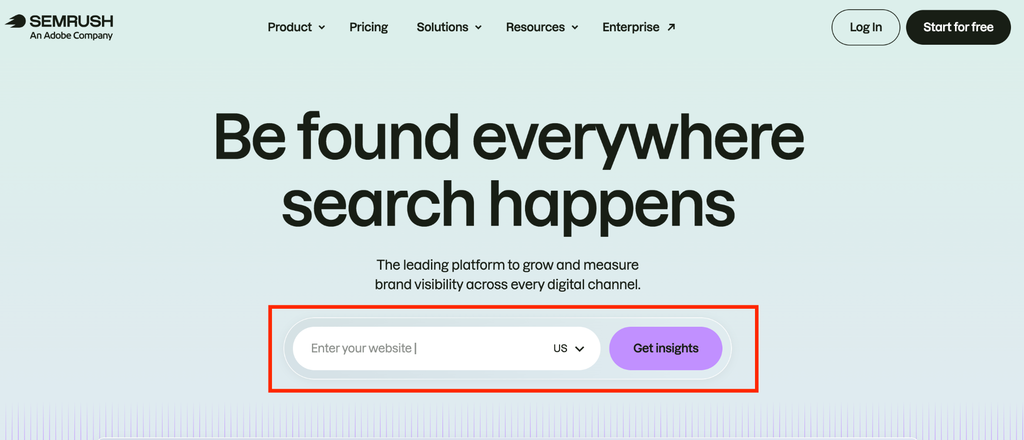
For example, Semrush, a popular SaaS SEO platform, offers 1 free analytical report for users, but a subscription is required to unlock more reports.
Stage 5: Link building for SaaS authority
SaaS websites benefit a lot from backlinks, particularly backlinks from reputable software review sites, tech blogs, and industry publications. Backlinks bestow high search authority on your website, making Google more likely to suggest it. How can you get these backlinks? Here are proven ways:
Build linkable assets
The first step is creating assets that others naturally want to link to in the first place. For SaaS platforms, these assets can be:
| Asset type | Example | Link potential |
| A free interactive tool that fulfills a need | Semrush’s free Keyword Search Volume Checker, which gives users detailed search trend reports for specific keywords. | Very high potential, as websites often direct users to valuable free tools. |
| Original research & detailed insights | Salesforce’s “State of Marketing” reports, which offer free detailed insights about global marketing trends. | High potential from data & infographic citations. |
| Software directories, glossaries, and prompt libraries. | AIRPM’s Generative AI glossary, a vast library of definitions for key AI topics software developers are interested in. | High potential from SaaS-related websites directing users to free learning resources. |
Guest-post on relevant SaaS blogs
You can publish guest posts on tech blogs and industry publications, then add some links to your website within the posts. Target publications related to your SaaS niche. For example, a SaaS platform for real estate agents will benefit from publishing on Inman, a popular real estate news publication.
After finding a fitting website, send a guest-post pitch to their contact email address. To get the best results, offer something valuable. For instance, mention a topic you think the publication hasn’t covered in detail, then offer to publish a detailed guest post on that topic. Here’s a template:
Hi [Editor’s Name],
I hope you’re having a good week.
I’ve been following [Publication Name] for a while now and love your content on [reference a specific topic]. But I noticed you haven’t covered the specific challenges of [missing topic you want to cover].
As a real estate operations manager who has managed dozens of properties over the last four years, I’d love to write a practical guide on [the missing topic] for your readers.
Here are potential angles we could use:
Suggested post topic 1
Suggested post topic 2
Suggested post topic 3
To provide an idea of my writing style, here’s a recent piece I wrote on [Your Website’s Name]: URL link to the piece
Let me know if any of these angles resonate with you.
Cheers,
[Your Name]
[Website Name/Your Title]
[Link to your website]
Recover unlinked brand mentions
A creative way to get backlinks is by observing when other websites mention your brand but don’t link to it. Then, contact these websites with a polite request to add your link to the brand name. Because your brand name is already mentioned, website owners become more willing to add the link. SEO tools like Semrush and Ahrefs let you easily track unlinked brand mentions, and you’ll quickly send out link requests.
[Want a helping hand in implementing these SaaS SEO steps? We are one call away at Why SEO Serious, so book an appointment today]
Essential SaaS SEO tools for 2026
A guide to SaaS SEO is incomplete without describing the software tools that help you implement a proper SEO strategy. Just above, we explained how to implement SEO step-by-step, but what tools help you do this effectively? Let’s take a look.
| Tool | Best for | Price | Alternative |
| Ahrefs or Semrush | Competitive analysis | Freemium (Ahrefs’ paid plans start from $129 per month, and Semrush’s start from $139 per month) | SE Ranking |
| Google Analytics | Monitoring SEO performance | Free | Microsoft Clarity (also a free tool) |
| Screaming Frog | Technical SEO audits | Freemium (paid plan costs $279 per year) | Sitebulb |
| Surfer SEO | Content optimisation | Starts from $98 per month | Semrush’s SEO writing assistant |
| Hotjar | Conversion research | Freemium (paid plans start from $39 per month) | Mouseflow and Microsoft Clarity |
Ahrefs or Semrush for competitive analysis
Ahrefs and Semrush are two popular SEO platforms with many features, but we’re highlighting them for competitive analysis. Want to beat your competition? You’ll need to know what they do, then get better at it. These tools let you analyse your competitors’ SEO metrics, including their target keywords, backlinks, Domain Authority scores, and traffic volumes.

Google Search Console for performance
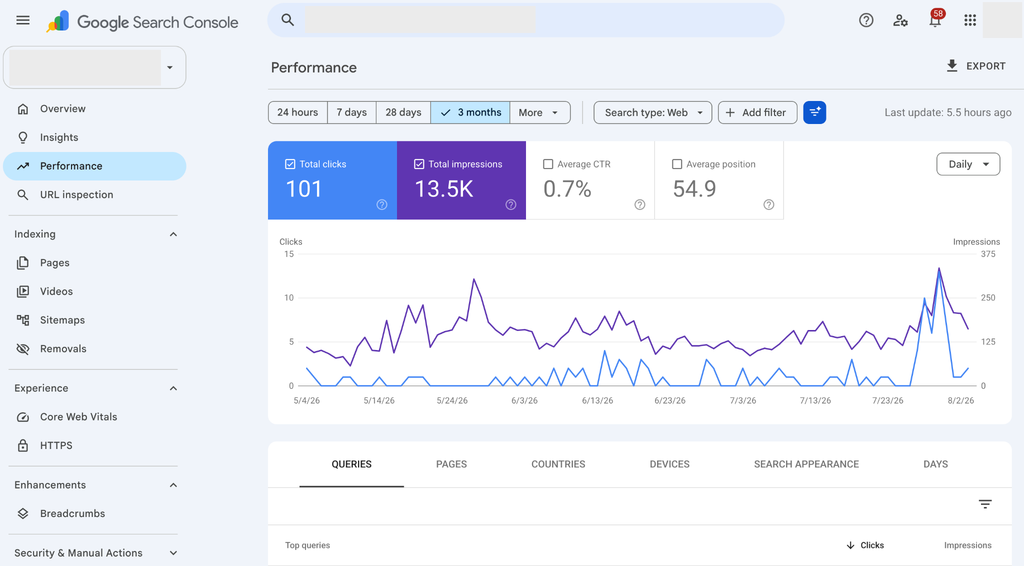
Google provides a free Search Console tool that tracks how your website shows up in Google search results. You can see your website’s search position for specific keywords, a list of all internal links and backlinks detected by Google, and your performance for the Core Web Vitals explained earlier. You can also submit sitemaps to help Google search bots crawl your website better.

Screaming Frog’s SEO Spider for technical audits
Want to evaluate your site’s technical SEO performance to the best possible depth? Screaming Frog’s SEO Spider is the go-to solution. It deeply scans your website for over 300 technical SEO attributes and identifies problems like broken links, missing meta tags, improper redirects, and mobile-friendliness. The free version scans a maximum of 500 URLs, but the paid version can scan unlimited pages on your website.
Surfer SEO for content optimisation
Surfer SEO is an on-page optimisation tool. It suggests relevant keywords to incorporate into your content and groups them into topic clusters to create articles on. When writing, it suggests where to place keywords, internal links, images, and other elements that help boost search visibility. This tool connects directly with Google Docs and WordPress, so writers can easily integrate it into their workflow.
![A-sample-of-using-Surfer-SEO-to-optimise-contentHotjar for conversion research
Hotjar is the go-to tool for discovering how conversions occur on your SaaS website. It offers a heatmap of your website, detailing where users click, tap, and scroll the most. It plays back user sessions so that you'll spot friction points hindering signups. This tool monitors how users visually interact with your website, and you’ll know where to improve to ensure a smooth user experience. This smooth experience converts organic SEO-derived traffic into paying SaaS subscribers.
How to measure SaaS SEO success
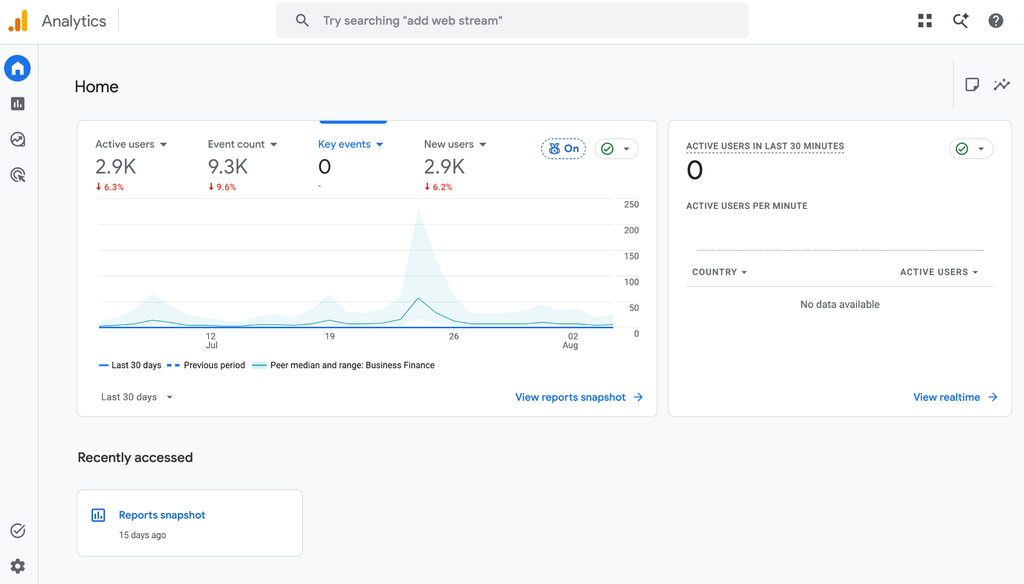
You’ve learned how to implement an effective SaaS SEO strategy and the tools that help you in the journey. How then can you measure the success of your SEO efforts? Luckily, Google provides a free Analytics tool that lets website owners track every part of their traffic. What traffic metrics should you track? Here are the most essential:
A sample Google Analytics dashboard
[ALT] A-sample-Google-Analytics-dashboard](https://whyseoserious.com/wp-content/uploads/2026/10/image-8-1024x485.png)
Source: Surfer SEO
Hotjar for conversion research
Hotjar is the go-to tool for discovering how conversions occur on your SaaS website. It offers a heatmap of your website, detailing where users click, tap, and scroll the most. It plays back user sessions so that you’ll spot friction points hindering signups. This tool monitors how users visually interact with your website, and you’ll know where to improve to ensure a smooth user experience. This smooth experience converts organic SEO-derived traffic into paying SaaS subscribers.
How to measure SaaS SEO success
You’ve learned how to implement an effective SaaS SEO strategy and the tools that help you in the journey. How then can you measure the success of your SEO efforts? Luckily, Google provides a free Analytics tool that lets website owners track every part of their traffic. What traffic metrics should you track? Here are the most essential:
Organic trial signups
Observe the number of signups that come from organic search traffic. On Google Analytics, it starts by creating a custom event that identifies a trial signup on Google Analytics. You can name it something like sign_up or start_trial.
- Then, head to Reports > Acquisition > Traffic acquisition.
- Look for Organic Search in the table column, then the Conversion column, and choose your specific trial signup event (like sign_up or start_trial). You’ll see the number of actions (organic search-derived signups in this case).
Keyword rankings by intent stage
Check your rankings for target keywords at every stage of the funnel:
- Top of the Funnel (TOFU), the awareness stage.
- Middle of the Funnel (MOFU), the consideration stage.
- Bottom of the Funnel (BOFU), the decision stage.
Let’s recall the sample keywords for each stage that we provided earlier:
| Top of the funnel | How to share files over emailHow to fix “out of storage space” warningsHow to free up server storageRunning out of server spaceHow to back up files automatically |
| Middle of the Funnel | Best cloud storage solutions for healthcare companies.[Your SaaS platform] vs. [A competitor].Cloud storage platforms’ comparison table.Most affordable cloud storage providers. |
| Bottom of the Funnel | [Your SaaS platform] complete review.Encrypted cloud storage reviews.Best cloud storage platform like [open-source alternative].[Competitor] storage limits workaround. |
These are the types of keywords to meticulously track your SaaS website’s rankings for.
Organic traffic to pricing & demo pages
Monitor the number of organic visits to your SaaS pricing and demo pages. These pages are what users interact with before proceeding to free trials or subscription payments, so they are the most important. The higher the traffic, the more conversions you can eventually get from search engine traffic.
Conversion rate from blog to product
Conversions don’t only come from pricing and demo pages. They also originate from blog posts, which are created first to inform users about potential solutions, then quietly pitch your SaaS platform as the ideal solution. Monitor how many conversions come from the blog section. If unsatisfactory, create more helpful, in-depth, keyword-rich content to attract SaaS decision-makers who can eventually purchase subscriptions.
Conclusion
SaaS SEO is a meticulous, multi-step process that differs from generic SEO. We’ve documented the right steps to take, the tools that help, and how to measure your SaaS SEO performance. We understand it can feel like a lot, which is why many companies hire a SaaS SEO agency to handle it. If that’s your aim, look no further than Why SEO Serious to create and implement the right strategy that’ll elevate your SaaS SEO subscriptions. Contact us today to see how we can help.
Book a consultation with Why SEO Serious
to elevate your SaaS business
FAQs
What is SEO for SaaS?
It’s the practice of optimising a SaaS website to rank high on search engines. High rankings generate organic traffic, which you can convert into paid subscriptions.
How does SaaS SEO differ from regular SEO?
SaaS follows a multi-step, longer process than traditional SEO. The latter focuses mostly on acquiring organic traffic, but SaaS SEO focuses on first getting organic traffic, then converting the traffic into subscriptions. SaaS SEO optimisation prioritises product-led content, free trials, and demo page conversions over organic page views.
How quickly will SaaS SEO results disappear?
SaaS SEO results don’t fade away overnight. They gradually decline over 3 to 12 months if you don’t actively maintain optimisation efforts. That’s why we emphasise that SEO isn’t a one-time effort, but an active, long-term journey.