Contents
You’ve probably searched for something like “restaurants near me,” and Google quickly displayed some of the best options available, and you wondered, how do I get my business to appear in these lists? Those listings weren’t shown by accident. Google showed the profiles of businesses that have created distinct profiles, complete with their location, opening hours, and menus. When you clicked the search button, you found the local businesses matching your search queries.
If you run a physical business, you obviously want to get discovered on Google, and this works by creating and optimising your Google Business Profile. Here’s your detailed guide to optimising this profile and climbing your way to the top of search results.
What is Google Business Profile in simple terms?
Google Business Profile is a free online tool that lets businesses manage how they appear on search results. This tool displays key business details like address, opening hours, and phone numbers, enabling customers to discover and contact the business easily.
Here’s a sample Google Business Profile listing the opening hours, physical address, customer reviews, menu, and contact information of a Pret A Manger sandwich shop in London:
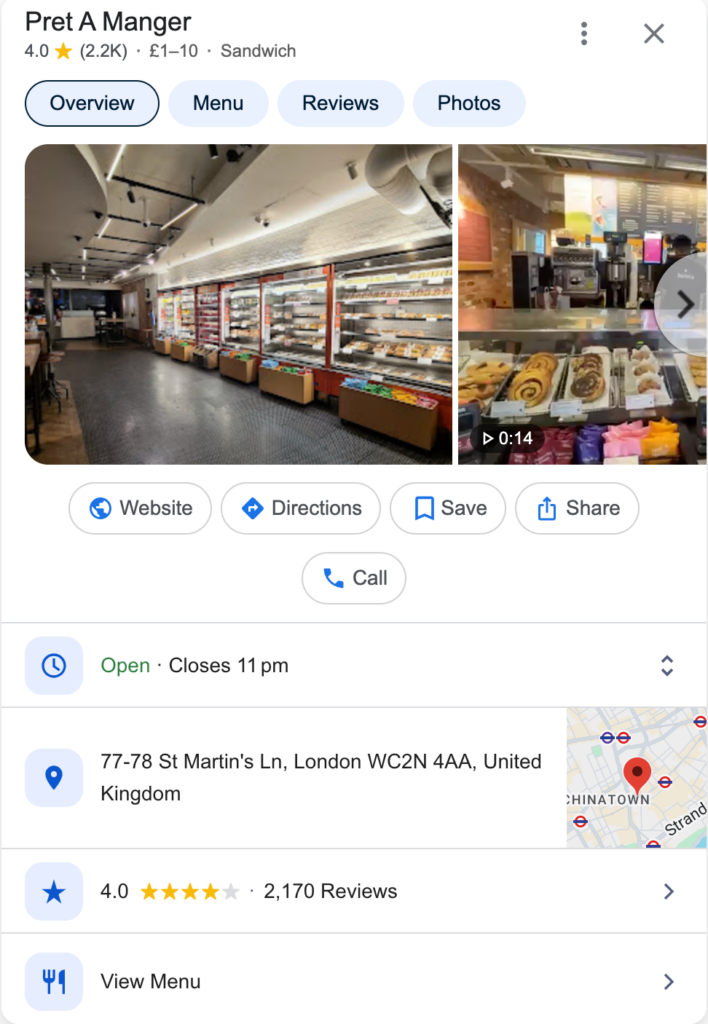
With the above details, anyone in London interested in sandwiches can quickly find this Pret A Manger outlet, learn what it offers, and contact the shop if need be. The same applies to any business you run, as you want potential customers to quickly find its details on Google.
Why Google Business Profile matters for local SEO
A Business Profile determines how easily potential customers find your business on Google search results pages. Remember that you are competing with many other businesses within your vicinity, so an optimised business profile helps yours stand out above the rest.
Impact on Local Pack rankings
The ultimate goal of optimising your Google Business Profile is to appear on Local Pack, the box of three top listings displayed whenever someone searches for a location-based query.
For example, a quick search for “restaurants in Hong Kong” showed these three Local Pack results (plus a sponsored ad above them):
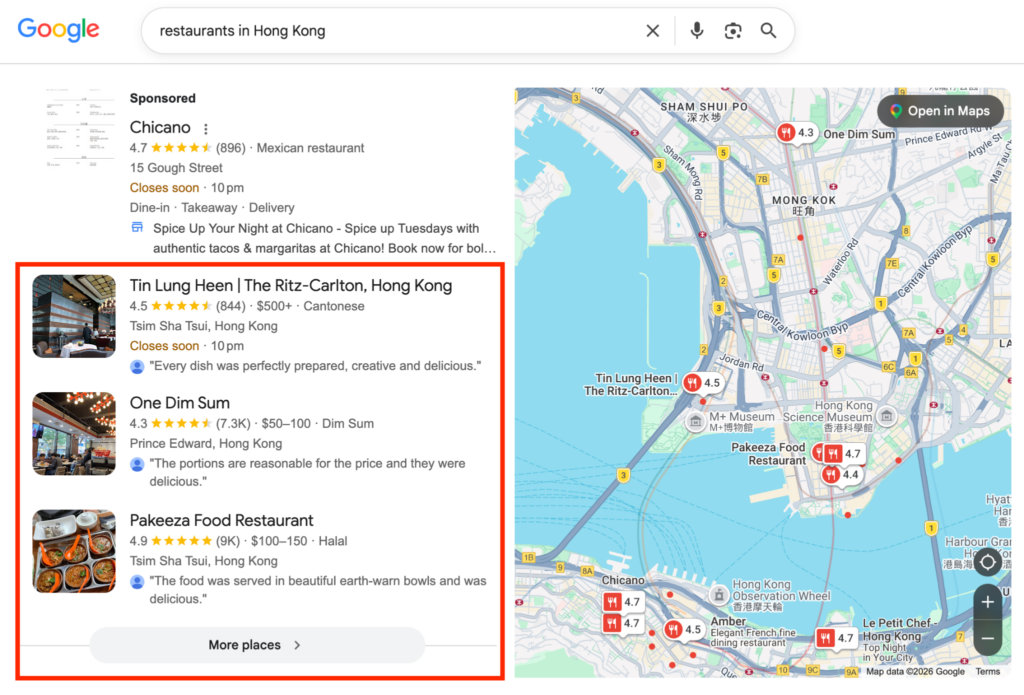
Many Hong Kong visitors definitely search for “restaurants in Hong Kong,” and these three businesses dominate the Local Pack rankings. They’ll get a lot of foot traffic because people often visit the top places suggested by Google.
Entering the Local Pack brings foot traffic and boosts sales, so it’s the ultimate goal of optimising your Google Business Profile.
Building trust and driving conversions
Optimising a Google Business SEO Profile revolves around building trust by providing transparent information. The profile should clearly state your business address, where customers can quickly find you, an email address or phone number for leads to contact you, opening and closing hours, and a price list. This way, customers already know what to expect and can budget accordingly.
For each profile, Google displays reviews left by previous customers. Strive for an average of 4.5 stars, as this displays superb customer service to someone discovering your business for the first time. Don’t hesitate to reply to customer reviews, whether positive or negative, in a respectful manner.

How to create and verify your Google Business Profile
Creating a Google Business Profile (GBP) is a straightforward yet meticulous process. It’s simple but requires paying attention to various details, which we’ll explain below:
- Check for an existing profile
The first step is actually checking if a profile already exists under your business name. Search for the name and see if anything pops up.
Anyone can create a profile for a business, so someone may have possibly made one under your name. Sometimes, it could be customers creating a profile for a business they patronised.
If someone has already created a profile for your business, don’t panic. You can always verify your business identity and claim the profile. If no profile already exists, you can create one from scratch.
- Create or claim your profile
If a profile popped up after searching for your business name, it means one already exists. To claim it, select Own this business?, then Manage now. Then, choose a verification option, either a video recording, a live video call with a Google support agent, a postcard with a unique code mailed to the business address, or an automated call or SMS sent to the listed business phone number.
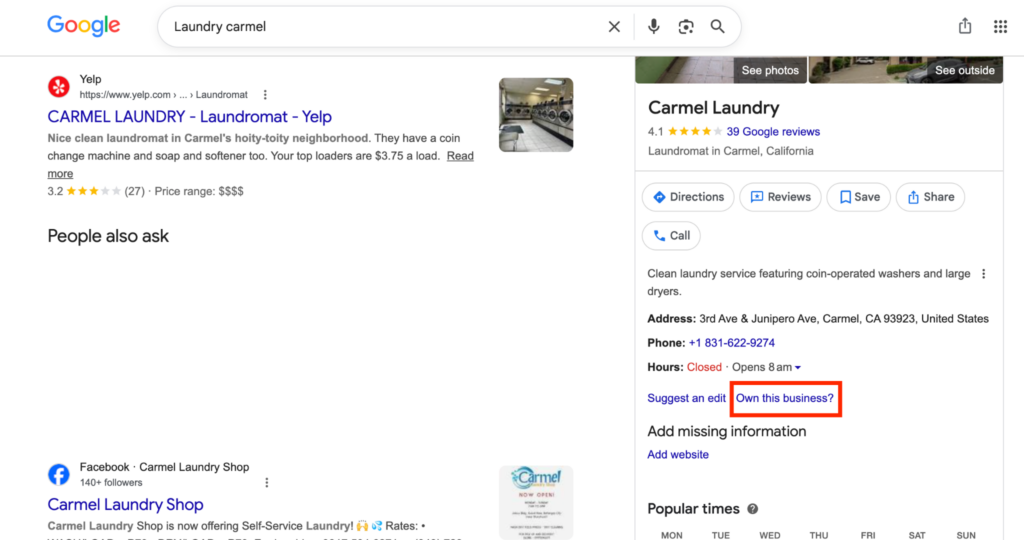
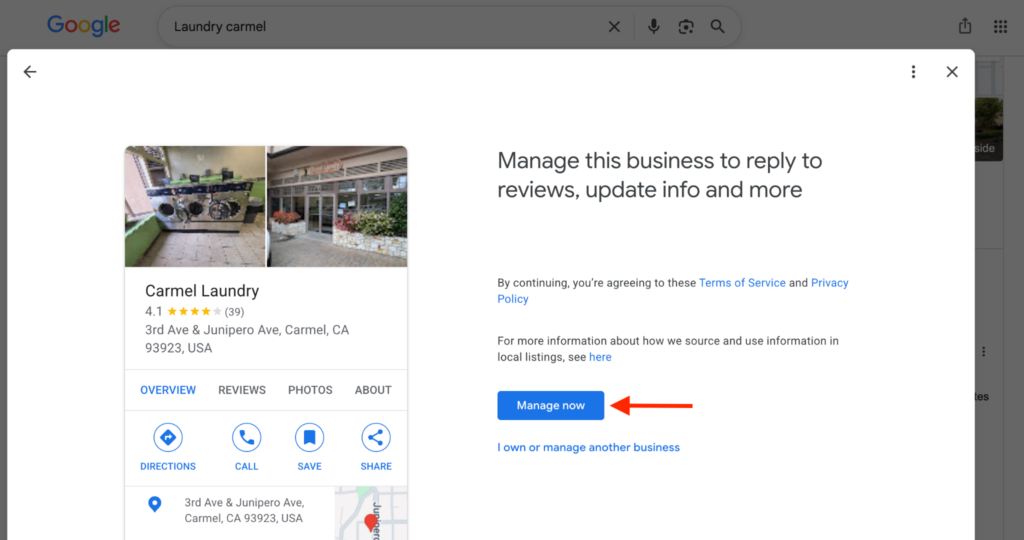
The verification process may take days, particularly if receiving a physical postcard with a code that you’ll then input on Google.
To create a new profile from scratch, head to business.google.com and click on Create your profile in the homepage. You’ll need to sign in to proceed.
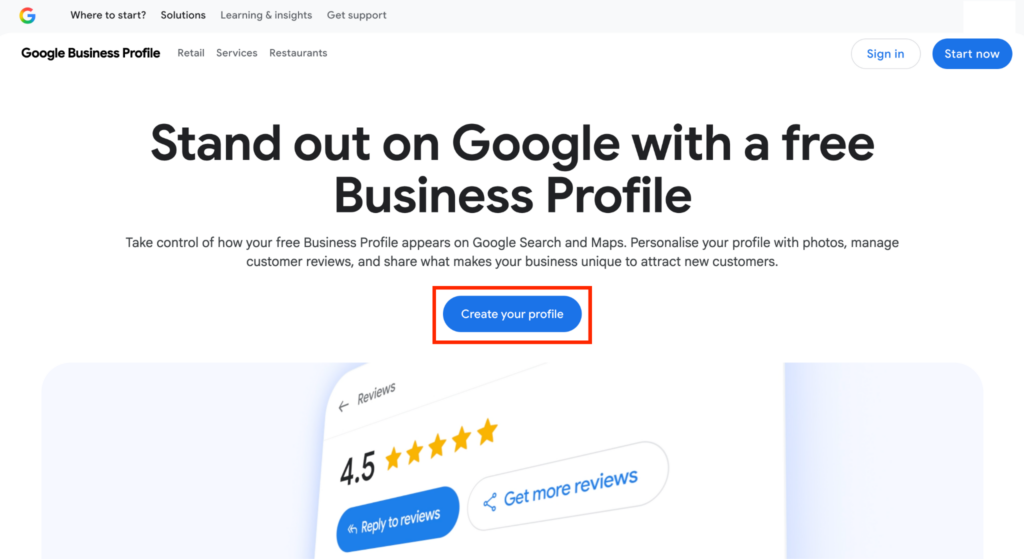
Then, enter your business name and details, including category, phone number or email address, address, website, and opening hours. Afterward, you’ll need to verify business ownership.
- Verify your business (Mail, phone, video, etc.)
Just above, we listed several verification methods for claiming an existing business profile, including a video recording, a live video call with a Google support agent, a postcard with a unique code mailed to the business address, or an automated call or SMS sent to the listed business phone number. The same applies to verifying a newly created profile. Google requires verification to ensure that businesses are assigned to their rightful owners, not just anyone.
Verification can take a few hours to several days, depending on the method. Choose your method and follow the on-screen instructions to complete the process.
What to do if your profile is suspended?
Google can suspend a business profile for various reasons, like using an invalid address, showing different contact information from what’s on the official website, and duplicate listings tied to the same address.
If this happens, you can take steps to rectify the situation. Log in to business.google.com to see the reason why your profile was suspended. Then, correct the details and resubmit for verification. You may be required to provide documents like a utility bill, formal lease agreement, bank statement, or tax certificate. Google’s team will verify the documentation and restore your profile if it’s found satisfactory.
Core optimisation checklist
A well-optimised profile contains detailed information. Here’s a checklist of what to include to ensure your business profile is in the best shape:
Business name (NAP consistency)
Provide a business name that matches the Name, Address, and Phone number (NAP) anywhere your business appears online. It should match your business’s real-world name, ensuring customers deal with the same entity across different channels.
Address and service area
Provide a physical address where your business is based. But if you run a service-based business where you visit customers directly instead of them coming to you, list your service areas, which are the towns or zip codes where your services are offered.
Phone number and website URL
List a local phone number that routes directly to you or a business representative, not a call center number. Also, provide an official website address that customers can visit to learn more about your business. The web address can direct customers to your homepage or a designated landing page.
Business hours (regular and special)
Enter your opening and closing hours for both regular days, weekends, and special periods like public holidays. This information lets users know when you’re open or closed, rather than heading to your store and getting disappointed.
Products and services
List the products and services your business offers. For example, a restaurant should list its complete menu to help customers plan their budget before visiting. A service-based company should list its services and price ranges, helping customers plan before contacting the business.
Business description with keywords
Precisely describe your business, incorporating keywords that you want to rank for. Google uses this description to suggest your business to the right audience, so optimising it matters a lot.
Attributes and amenities
List the amenities and unique attributes of your business. For example, if your cafe offers free WiFi and parking, be sure to highlight these amenities. You’d be surprised how many will visit for the amenities first, not the meals.
Why SEO Serious helps businesses optimise Google Business Profiles and handle other aspects of local SEO.
Contact us today to book a consultation.
Advanced strategies to dominate the Local Pack
We’ve listed the core details to include in your business profile. Now, with these details included, it’s time to learn creative strategies that’ll help vault you into the top-three Local Pack results.
Review management: Generation and responses
Reviews contribute a lot to Local Pack rankings. Businesses with overwhelmingly positive reviews have higher chances of climbing into the top three, so review optimisation is non-negotiable.
Firstly, offering excellent service is the most proven way to receive positive reviews. Very satisfied customers won’t hesitate to say how good your service is, promoting it to other viewers.
Yet, reviews need to be managed after customers post them. If someone leaves a positive review, reply in an appreciative tone like “Thank you for your review, we strive to keep doing better to please customers” or something similar.
If a customer leaves a negative review, reply in a reconciliatory tone like “We’re sorry you had a bad experience. We’ve noted your complaint and will endeavor to do better next time.” Avoid replying with a negative tone, as it looks unprofessional to viewers. Responding to reviews signals a business actively engaging with customers and increases the chances of getting into the coveted Local Pack.
How to get more reviews legally
You can encourage customers to leave reviews on your website, maybe in exchange for a freebie or discount. For example, if you run a cafe, your receipt printouts can include a small “Please leave us a review on Google” at the bottom. An order confirmation sent via email or SMS can also include a similar message. A simple nudge after a customer interaction is the most proven way to get reviews.
Response templates for positive and negative reviews
Earlier, we gave examples of replying to positive or negative reviews, in an appreciative and reconciliatory tone, respectively. Yet, note that responses should be personalised, not generic words that feel like copy-paste.
An appreciative response should acknowledge exactly what the customer highlighted, like “We’re glad you enjoyed our Doppio Espresso, we hope to see you again!” or “We’re happy you loved our Japanese landscape design, and we can’t wait to see the results in a few months’ time.”
A reconciliatory tone should similarly acknowledge what the customer complained about, like “We’re sorry that you experienced long wait times. Please be assured that we’ll do our best to improve your experience henceforth.” Recognising the customer’s particular praise or complaint sets these responses apart from generic ones.
Google Posts: Offers, events, and announcements
Google lets businesses post on their profile. You can use posts to share business updates (e.g., “We’re having a paint-and-sip on [specific date]”), highlight discounts with specific start and end dates, and promote upcoming events. These posts are like mini-ads inside your business profile, giving customers the latest news and offers. You can link posts to specific landing pages on your business website.
Q&A
Google used to offer a dedicated Q&A section on business profiles, letting customers learn answers to basic questions without calling, but this feature was discontinued in November 2025. Now, Google pulls answers from your business website, so you should have a dedicated FAQ page with answers to routine questions. When customers search similar questions about your business, Google will reference answers on the FAQs page.
Photos and videos
You can post high-quality photos and videos of your business to entice customers. Surely, people would love to see that nicely decorated cafe, that lush garden, and the exciting game rooms at your spot. Sometimes, customers post pictures of their visits, and you can highlight them on your profile to encourage more visits. These photos improve click-through rates from people who come across your Google Business Profile.
Connecting your Google Business Profile to your website
You can connect a Google Business Profile to your official website, and we don’t mean just adding the link. There are two major ways:
Local landing pages
If your business runs multiple outlets in different locations, you can create a separate landing page for each location. First, you’ll create a separate Google Business Profile for every location. Then, you’ll create distinct landing pages for all locations, and link every profile to its respective location.
Suppose your restaurant has three outlets across Dallas, Houston, and San Antonio. Each outlet will have a distinct Google Business Profile, and the profile will display its unique landing page. This structure ensures that customers get exact information for every outlet, not generic info that may not apply at a specific time. For example, if the Dallas cafe is out of milkshakes, you don’t want customers assuming that because the Houston location still has them, they’ll still be available in Dallas, then end up disappointed when they visit.
LocalBusiness schema markup on your site
A schema markup is a code snippet added to your website’s backend, and it feeds Google precise details about your business. In this case, the LocalBusiness schema markup tells Google your business name, address, phone number, and opening hours. It looks like this:
| { “@context”: “https://schema.org”, “@type”: “LocalBusiness”, “name”: “Example Cafe”, “image”: “https://WebsiteName.com”, “telephone”: “+33…..“, “url”: “https://WebsiteName.com“, “address”: { “@type”: { “@context”: “https://schema.org”, “@type”: “LocalBusiness”, “name”: “Example Cafe”, “image”: “https://WebsiteName.com”, “telephone”: “+33…..“, |
| “url”: “https://WebsiteName.com“, “address”: { “@type”: “PostalAddress”, “streetAddress”: “32 Bernard Street“, “addressLocality”: “London“, “addressRegion”: “Greater London“, “postalCode”: “WC1N 1AW“, “addressCountry”: “GB“ }, “geo”: { “@type”: “GeoCoordinates”, “Latitude”: 51.5231° N “longitude”: 0.1247° W }, “openingHoursSpecification”: [ { “@type”: “OpeningHoursSpecification”, “dayOfWeek”: [“Monday“, “Tuesday“, “Wednesday“, “Thursday“, “Friday“], “opens”: “08:00“, “closes”: “18:00“ } ] } |
In the above schema markup example, we’ve highlighted key information like the business website, opening hours, and address down to the postal code, latitude, and longitude. Always ensure the schema markup information matches that of your Google Business Profile.

Local citations and NAP consistency
Google doesn’t only consider information listed on your Business Profile. It also fetches details from your official website and external business directories, so the information should be consistent. Particularly, the business name, address, and phone number (NAP) should be the same wherever your business is listed. This uniformity tells search algorithms that your business is trustworthy, helping secure higher rankings.
Why NAP consistency is critical
Name, address, and phone number (NAP) are the key details for every business. Without uniformity across various platforms, search engines become confused about which to cite, resulting in lower rankings. Google’s algorithm prioritises businesses with consistent details to ensure users get exactly what they seek.
How to analyse competitors in local search
Want to rank above your competitors? You’ll need to learn what they do to beat them at their game. Entering the Local Pack requires carefully analysing your competitors’ business profile optimisation strategies, then improving on them. Let’s see how to do that:
Competitor category and attribute analysis
- Check the top three businesses shown on the Local Pack.
- Note all the attributes included in their profiles. For example, a search for “restaurants in Miami” showed the following results:
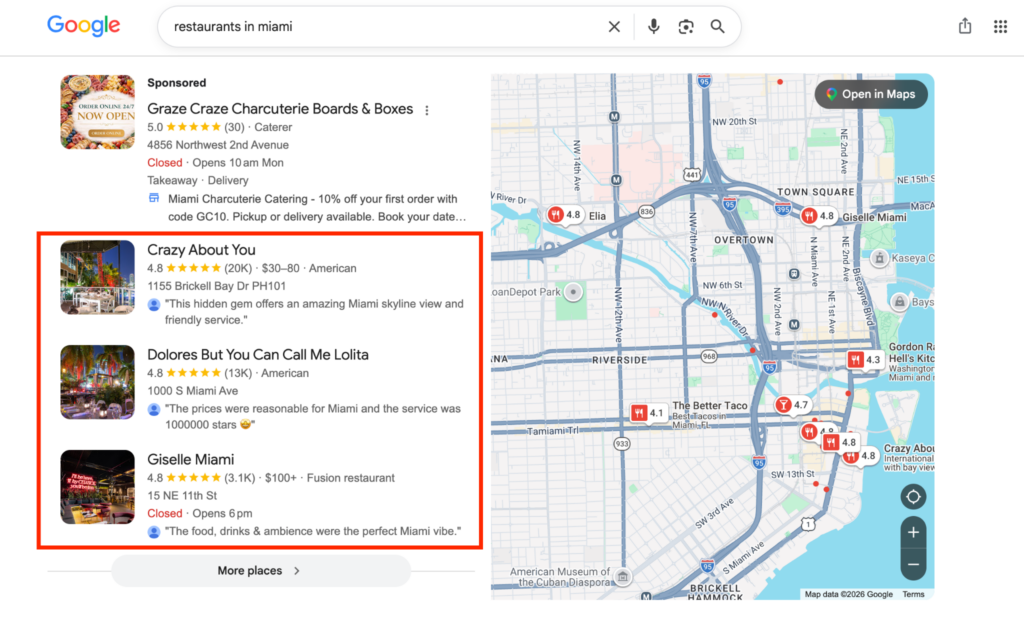
3. In the results, every business profile includes a precise address, opening hours, official website, phone number, and a detailed menu with prices. This means that to rank high for similar queries, you should include all this information.
4. Check for any attributes missing on your own Google Business Profile and add them immediately.
Analyse reviews and activities
By studying your competitors’ reviews, you’ll learn their customers’ pain points, which you can improve on to outrank them. For example, if a rival restaurant’s customers frequently complain about delayed orders, make your ordering process faster to draw customers, who’ll then leave positive reviews about your restaurant.
Also, learn from competitors’ positive reviews. Note what they excel at and strive to match their standards in those categories.
Likewise, check your competitors’ posts and note what they promote to customers. Then, match their offers or do even more to snag their customers. Google local SEO is highly competitive, so keeping tabs on your rivals helps you forge ahead.
Key metrics to track Google Business Profile performance
You’ve learned how to put your business on Google. But it’s one thing to optimise and another to know whether your optimisation strategy works. How do you measure the success of your Google Business Profile optimisation? Use these key metrics:
Search and map views
Check how many people view your business profile on Google.com or Google Maps. From your Google Business Profile dashboard, you’ll see the number of people who viewed your profile through Search or Maps, the exact keywords they searched for to find the profile, and whether they viewed it on a mobile device or PC.
Actions (Calls, direction requests, website clicks)
Google also displays how many times viewers clicked on your profile link, the number of calls made to the listed phone number, and how many users asked for directions to the listed business address. These metrics are displayed in an interactive format, so you don’t need to stress about tracking your profile performance.

Common Google Business Profile mistakes to avoid
Understandably, no one optimises their Google Business local SEO profile perfectly. However, there are some common mistakes to watch out for, including:
Inconsistent NAP
We’ve repeatedly emphasised the importance of name, address, and phone number (NAP) being consistent across all platforms. Some businesses use different details in their profiles than are found on other sources, but this leads to lower rankings and potentially a suspension. Ensure the information on the Google Business SEO profile matches what’s on your website and other online directories.
Wrong categories
This mistake feels trivial, but it can massively dent rankings. Don’t select a business category that’s too broad, or you’ll likely not show up where it matters. For example, if you run a nail salon, indicate your category as Nail Salon, not just Salon.
Fortunately, Google lets you select one primary category and up to nine secondary categories, so if your spot offers multiple services, you can list them all.
Outdated hours
Failing to update opening and closing hours on special days has led to many customer disappointments. During a public holiday or other special days, if you’re closed or opening later than usual, always indicate on your business profile. Otherwise, customers may visit and meet a closed outlet, souring your brand reputation.
Ignoring reviews
Business owners often ignore replying to reviews, but that shouldn’t be. Ignoring them hurts brand credibility in the long run. From a viewer’s perspective, a brand that doesn’t engage with customers online may not be worthwhile. Google also deprioritises profiles that don’t engage with reviews. Earlier on, we emphasised why you should reply to both positive and negative reviews and how to do so.
Missing photos
Don’t neglect to include high-quality photos and videos of what to offer. Customers need real-life examples, not just descriptions, of what to expect. Adding photos and videos entices people to visit your outlet or press the call button.
No posting
A Google Business Profile may not be a social media account, but it’s also an effective way to communicate with customers. Don’t keep the posts section empty. Instead, post regular updates to connect with viewers and build a loyal customer base.
[Want to avoid these mistakes? Fill out our form to book an SEO consultation with Why SEO Serious]
Conclusion
We’ve come so far in this journey. You’ve learned what needs to be done to optimise your Google Business Profile and outrank rivals. If all these sounds too much for you, we understand. You don’t have to do it all yourself. Instead, you can hire a professional SEO firm to handle it on your behalf, alongside the many other aspects of optimising for higher search rankings. Why SEO Serious is your go-to agency, so contact us today to elevate your business.
FAQs
Can I do SEO on Google Business Profile?
Yes, you can optimise your Google Business Profile for higher rankings and to enter the coveted Local Pack. Including all relevant business details, engaging with reviews, and posting regularly are key optimisation strategies.
Is Google Business Profile important for SEO?
Yes, your Google Business Profile is highly important for SEO rankings. Businesses with well-optimised profiles get discovered easily and outrank those without profiles or having poorly optimised profiles.
Is there a Google Business Profile optimisation service?
At Why SEO Serious, we help businesses optimise their profiles to outrank competitors and get into the Local Pack. Contact us today to see how we can help.